
IP65 POS Terminals Explained: What Businesses Should Know Before Buying
Sep 21, 2026A POS terminal may spend its entire working life on a countertop, but that does not mean it operates in an easy environment.
Restaurant counters are exposed to drinks, grease, steam, and frequent cleaning. Bakeries deal with airborne flour. Seafood shops and fresh-food retailers work around moisture and ice. Outdoor kiosks face dust, rain, temperature changes, and wind-blown debris. Warehouses and workshops introduce yet another combination of particles, vibration, and industrial contamination.
Under these conditions, processing speed is only one part of POS reliability. The physical design of the terminal becomes equally important.
This is why IP65 POS terminals are increasingly considered for demanding commercial installations. However, an IP65 label should not automatically be interpreted as “completely waterproof,” nor does it mean every component of the POS station has the same level of protection.
For retailers, restaurant operators, POS distributors, software companies, and system integrators, understanding exactly what IP65 means can help prevent both under-specifying and over-specifying POS hardware.
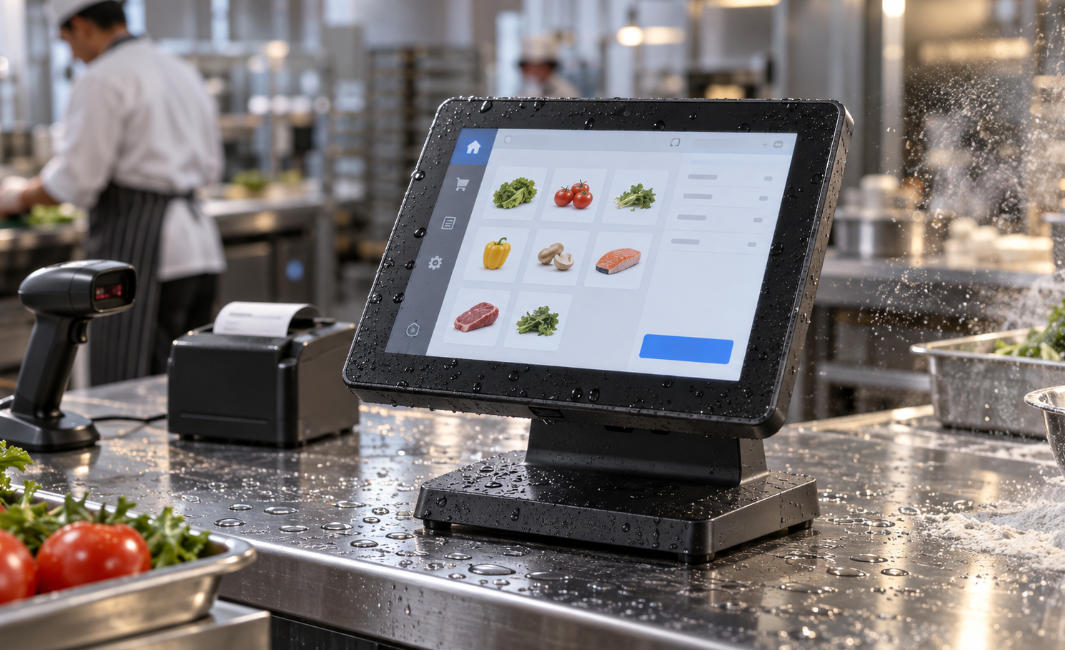
IP stands for Ingress Protection, a classification system used to indicate how effectively an enclosure resists the entry of solid particles and water.
In an IP65 rating, the two digits describe different forms of protection.
The first digit, 6, represents protection against solid particles. An enclosure rated IP6X is considered dust-tight under the relevant test conditions.
The second digit, 5, represents protection against water jets. This means the tested enclosure is designed to resist water projected toward it under defined conditions.
For a POS terminal, these characteristics can provide an important additional layer of protection in environments where conventional commercial electronics may experience accelerated wear.
There is an important limitation, however:
IP65 does not mean the device can be submerged in water.
It also does not automatically mean the terminal can be cleaned using a high-pressure washer, exposed indefinitely to heavy rain, or installed outdoors without considering temperature, sunlight, cables, power supplies, and mounting conditions.
For a more basic comparison of IP ratings, AONPOS has also published a guide covering IP54 and IP65 waterproof and dustproof POS terminals.
The more important question for a commercial buyer is not simply whether “IP65” appears on the specification sheet. It is which part of the machine is actually IP65-rated and whether that protection matches the installation environment.
One of the most frequently overlooked details when evaluating rugged POS hardware is the difference between front-panel protection and complete enclosure protection.
Some terminals use an IP65-rated front touchscreen surface. This can be highly useful because the display is often the area most exposed to spills, cleaning liquids, grease, and customer interaction.
However, an IP65 front panel does not necessarily mean:
the rear enclosure has the same rating;
exposed USB or serial ports are water-resistant;
ventilation openings are sealed;
the power connector is protected;
peripheral connections can tolerate water exposure.
This distinction is especially important for embedded terminals, panel PCs, industrial touchscreens, and countertop POS devices.
For example, a terminal installed flush inside a kiosk enclosure may only require a sealed front surface because the rear electronics are protected inside the cabinet. A freestanding POS terminal installed next to a sink, outdoor service window, or food preparation area may require substantially more protection.
When comparing products, buyers should therefore ask:
Is the IP65 rating for the display surface, the front bezel, or the complete terminal enclosure?
That single question can eliminate a significant amount of ambiguity during procurement.
Water resistance receives most of the attention when discussing IP ratings, but the “6” in IP65 can be just as important.
Fine particles are a persistent problem for commercial electronics.
Consider a bakery where flour remains suspended in the air throughout the working day. A workshop may contain sawdust or fine industrial particles. A warehouse can accumulate packaging dust, while certain food-processing environments generate powders and dry ingredients.
When conventional fan-cooled computers continuously move air through their enclosures, airborne contaminants may gradually accumulate around fans, heat sinks, circuit boards, and ventilation openings.
This can affect cooling efficiency and increase maintenance requirements over time.
A sealed or highly protected enclosure reduces the number of pathways through which contamination can enter the device.
For this reason, ingress protection often works particularly well alongside fanless thermal architecture.
A fanless POS terminal does not rely on a cooling fan constantly drawing environmental air into the chassis. Instead, heat is dissipated through passive thermal design. For businesses comparing these approaches, the AONPOS guide to fanless vs. traditional POS systems provides a useful additional perspective.
IP protection and fanless construction are not the same feature, but together they can contribute to a POS platform designed for lower environmental exposure.
Not every business needs IP65 hardware.
A fashion boutique inside a climate-controlled shopping mall may gain little practical value from paying for additional environmental sealing. In contrast, several industries have much stronger reasons to consider it.
Food-service counters combine several risks in one location: liquids, grease, steam, food residue, and frequent cleaning.
A front-facing IP65 touchscreen can be valuable where staff regularly handle the POS terminal with damp or contaminated hands.
The design can also simplify routine surface cleaning because there are fewer opportunities for liquid to enter through gaps around the display.
However, buyers should still examine rear ports and cable routing carefully. A waterproof screen does not protect an exposed USB connector positioned directly beneath a beverage preparation area.
For bakeries, the challenge may be less about water and more about airborne material.
Flour and powdered ingredients can accumulate inside conventional electronic equipment over long operating periods. A sealed design, especially when combined with fanless cooling, may reduce internal contamination.
These environments illustrate why the solid-particle side of IP65 should not be treated as a secondary feature.
Fresh-food environments frequently involve ice, water, condensation, cleaning chemicals, and wet countertops.
Seafood counters are an obvious example, but similar considerations apply to butcher shops, produce preparation areas, flower shops, and selected supermarket departments.
Here, an IP65 front surface can help protect the most exposed part of the terminal during everyday operation and cleaning.
Mobile food businesses experience environmental conditions that ordinary indoor POS terminals were not necessarily designed to handle.
Dust can enter through open service windows. Rain may blow inward unexpectedly. Temperature and humidity can change rapidly during the day.
IP65 protection may therefore form part of a more appropriate hardware specification.
That said, outdoor deployment requires more than an IP rating. Screen brightness, operating temperature, UV exposure, thermal management, cable protection, and installation design must also be considered.
A warehouse terminal may be exposed to dust, cardboard fibers, packing material, dirty gloves, and frequent physical handling.
Industrial facilities may introduce even more challenging contaminants.
In these situations, ruggedness should be evaluated as a complete system characteristic rather than one specification number.
The enclosure, touchscreen, stand, connectors, storage technology, cooling architecture, and mounting system should all support the intended working environment.
One of the biggest specification mistakes is assuming that IP65 automatically qualifies a terminal for outdoor deployment.
Ingress protection only addresses specific forms of dust and water exposure.
A reliable outdoor terminal may also need to account for:
Display brightness. A normal indoor screen can become difficult to read under strong sunlight.
Temperature range. Electronics designed for climate-controlled stores may not perform reliably in very hot or cold conditions.
UV exposure. Long-term sunlight can affect plastics, coatings, displays, and adhesives.
Condensation. Rapid temperature changes can create moisture problems even when direct rain is not entering the enclosure.
Power protection. Outdoor power connections and adapters require appropriate protection.
Cable entry points. A sealed terminal can still become vulnerable if external cables enter through poorly protected openings.
Mounting stability. Wind, vibration, customer interaction, and accidental impact all influence installation requirements.
For outdoor kiosks in particular, IP protection should therefore be treated as one layer in a larger environmental design strategy.
A rugged enclosure is useful only if staff can operate the terminal efficiently.
Modern commercial POS hardware commonly uses capacitive touch technology because of its responsive interaction and familiar smartphone-like experience.
For IP65 projects, buyers should check how the touchscreen behaves under the actual operating conditions.
Questions worth testing include:
Can the screen register touches when slightly wet?
Does cleaning residue affect touch accuracy?
Will employees wear gloves?
Is the protective glass suitable for frequent wiping?
Does the touch controller support the intended operating system?
Is the display bright enough for the installation location?
These considerations are particularly important for hospitality and industrial projects, where the environment can be very different from a standard retail counter.
The POS terminal itself is rarely the complete checkout system.
A typical installation may also include:
barcode scanners;
receipt printers;
cash drawers;
customer displays;
payment terminals;
NFC readers;
weighing equipment;
external keyboards;
network connections.
These peripherals create additional connection points.
If the main touchscreen has strong ingress protection but its USB, LAN, serial, HDMI, and power connections remain exposed to liquid, the practical protection of the workstation can still be limited.
Cable orientation can matter as well. Ports positioned vertically upward may collect liquid more easily than downward-facing or internally routed connections.
For customized commercial projects, cable management should therefore be discussed during the hardware design stage rather than after installation.
This is particularly relevant to distributors and integrators building complete solutions around AONPOS all-in-one POS systems, where processor, storage, display, peripheral, and deployment requirements may vary between projects.
When purchasing commercial hardware, it is tempting to reduce durability to a single number.
In reality, a reliable POS terminal depends on several interconnected factors.
An IP65 enclosure cannot compensate for poor thermal engineering. A rugged touchscreen cannot prevent problems caused by an unstable power supply. A sealed terminal may still experience downtime if its storage device is unsuitable for continuous commercial use.
For demanding installations, buyers should evaluate:
Fanless construction may reduce moving parts and environmental air intake, but the chassis still needs to dissipate heat effectively.
Solid-state storage is generally attractive for POS applications because it has no moving mechanical components and supports responsive system operation.
Aluminum and other commercial-grade materials can contribute to structural stability and thermal dissipation.
The stand should remain stable during thousands of daily touchscreen interactions.
A rugged terminal still needs enough usable ports for printers, scanners, payment devices, customer displays, and other peripherals.
Environmental sealing should be balanced against maintenance requirements. A system that is extremely difficult to access may increase service time if internal components eventually need replacement.
For B2B buyers, these factors should be evaluated together rather than selecting equipment solely because “IP65” appears in the marketing material.
For POS distributors, software companies, solution providers, and private-label brands, an IP65 project often requires more technical discussion than a standard catalog order.
A useful procurement checklist includes the following questions:
Which surface or enclosure has the IP65 rating?
Was the configuration tested as a complete unit?
How are external ports protected?
Is the terminal fanless or actively cooled?
What operating temperature range is supported?
What touchscreen technology is used?
Can the device be used with gloves or wet fingers if required?
What CPU, RAM, and SSD configurations are available?
Can the enclosure, branding, ports, screen size, or mounting structure be customized?
How will added peripherals affect the environmental protection strategy?
These questions are particularly important in OEM/ODM projects because changing the enclosure, cutting additional openings, adding an MSR reader, camera, NFC module, or second display can change the way the system needs to be sealed.
AONPOS focuses on commercial POS hardware and supports OEM/ODM projects across all-in-one terminals, touchscreen systems, kiosks, and related checkout hardware. Buyers developing specialized POS projects can explore the broader AONPOS POS hardware range when determining the appropriate hardware architecture.
No.
The goal of hardware selection is not to purchase the highest specification available. It is to purchase the specification that matches the operating environment.
A standard commercial POS terminal can be entirely appropriate for clean, dry, climate-controlled retail environments.
IP65 becomes more valuable when there is meaningful exposure to dust, moisture, spills, repeated cleaning, or partially outdoor operating conditions.
In many projects, even partial protection may be sufficient. For example, an IP65 front touchscreen combined with protected rear installation may provide an effective balance between durability, serviceability, and cost.
The correct decision should therefore begin with an environmental assessment rather than a specification comparison.
IP65 is not simply a premium label for a rugged-looking POS terminal.
It is a useful engineering specification that can help reduce exposure to dust and water when implemented correctly. But buyers need to understand exactly what has been rated, what has not been rated, and how the complete POS workstation will be installed.
For restaurants, food production, outdoor service points, fresh-food retail, warehouses, and industrial applications, environmental protection can play a significant role in long-term hardware reliability.
At the same time, ingress protection should be considered together with fanless thermal design, touchscreen performance, storage, connectivity, operating temperature, peripherals, and serviceability.
For system integrators and OEM/ODM buyers, the best IP65 POS terminal is therefore not necessarily the model with the highest protection number on its specification sheet.
It is the terminal whose protection, performance, interfaces, mechanical design, and customization options have been engineered around the real environment in which it will operate.
That approach turns IP65 from a marketing specification into what it should be: a practical part of a reliable commercial POS hardware strategy.
العلامات :
Tel / Whatsapp : +86 -15999943922
بريد إلكتروني : nikki@aonpostech.com


© 2026 شنتشن Aonpos التكنولوجيا المحدودة .كل الحقوق محفوظة