Bakery POS System Guide: How to Choose the Right POS Hardware for Your Bakery
Jul 18, 2026
A bakery may look simple from the customer’s side: choose bread, order a cake, pay, and leave. Behind the counter, however, bakery operations can be surprisingly complex.
Employees must process morning rush-hour transactions, manage products with short shelf lives, record customized cake orders, apply discounts, accept multiple payment methods, and keep checkout lines moving. Bakeries that also operate cafés, delivery services, or multiple branches face even more operational pressure.
A reliable bakery POS system can bring these activities together, helping bakery owners improve transaction speed, reduce order mistakes, organize inventory, and create a more consistent customer experience.
This guide explains the essential features and hardware components of a bakery POS system, the differences between various configurations, and the factors businesses should consider when selecting POS hardware.
What Is a Bakery POS System?
A bakery POS system is a combination of software and hardware used to process sales and support daily bakery operations.
Depending on the software platform, the system may handle:
Counter sales
Product and price management
Cake and pastry customization
Ingredient or finished-product inventory
Customer loyalty programs
Employee permissions
Sales reporting
Online and delivery orders
Multi-location management
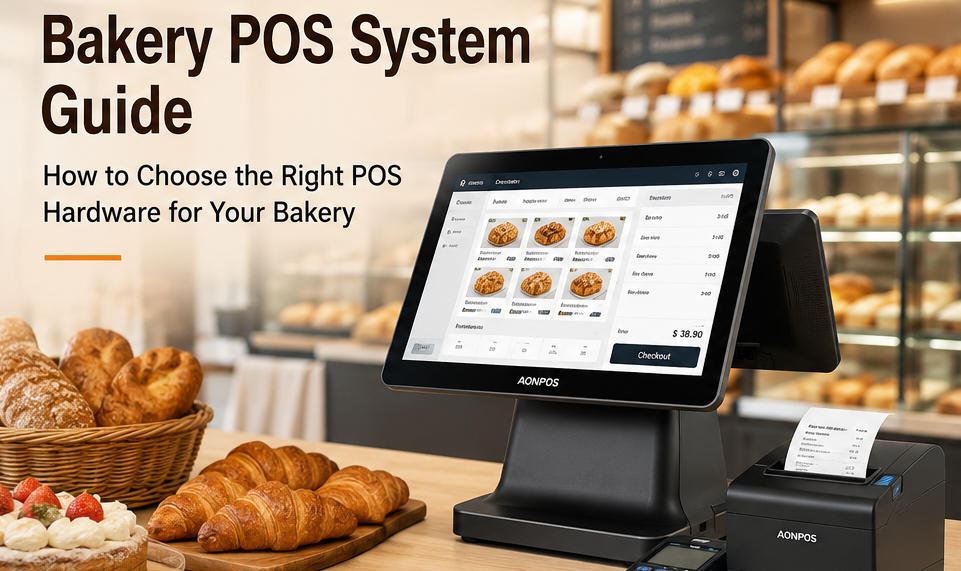
The hardware usually includes a touchscreen POS terminal, receipt printer, cash drawer, barcode scanner, payment terminal, and optional customer display.
The POS terminal acts as the central operating device. It runs the bakery’s POS software and connects with the peripherals needed to complete each transaction.
For bakery chains, POS software developers, distributors, and system integrators, selecting stable and compatible hardware is especially important. The terminal must operate reliably throughout long business hours while supporting the software, interfaces, and peripherals required by the project.
Businesses evaluating different terminal configurations can explore the AONPOS POS system range for all-in-one touchscreen hardware designed for retail and hospitality environments.
Why Bakeries Need a Specialized POS System
A general cash register may be sufficient for recording basic payments, but modern bakeries often require more operational flexibility.
Faster Checkout During Peak Hours
Many bakeries experience concentrated sales periods before work, during lunch, and in the early evening. A slow terminal or complicated interface can quickly create long queues.
A responsive touchscreen allows employees to locate products, select quantities, apply discounts, and complete payments with fewer steps. Frequently purchased products can be organized into visual categories such as:
Bread
Cakes
Pastries
Cookies
Sandwiches
Coffee
Beverages
Seasonal products
When the hardware responds quickly and the software interface is properly configured, employees can process more orders without sacrificing accuracy.
Better Handling of Product Variations
Bakery products are not always sold as standard items. Customers may request different sizes, flavors, fillings, decorations, packaging, or pickup dates.
A bakery POS system can allow staff to add modifiers to an order, such as:
Cake size
Sponge flavor
Cream or filling
Decoration style
Custom message
Allergy notes
Packaging requirements
Delivery or collection time
Recording these details digitally helps reduce the risk of incomplete handwritten notes and improves communication between front-counter employees and production teams.
Improved Inventory Visibility
Bakery inventory requires careful control because many products have limited shelf lives. Overstocking can create waste, while understocking can result in missed sales.
A compatible POS software platform may help track sales quantities, update stock levels, and identify products that sell quickly or frequently remain unsold.
This information can support more informed production planning. For example, a bakery may discover that croissant demand peaks on weekday mornings, while celebration cakes sell more frequently before weekends.
The POS system does not replace accurate production planning, but it can provide useful sales data for purchasing, baking schedules, and stock decisions.
More Accurate Order Processing
During busy periods, verbal communication can lead to mistakes. An employee may forget a cake inscription, select the wrong quantity, or fail to communicate a customer’s allergy request.
By recording order details directly in the bakery POS system, the business can create a clearer workflow from order entry to production and collection.
For bakeries with kitchen printers or order display systems, the POS can also transmit the order directly to the relevant preparation area, depending on software compatibility.
Consistent Multi-Location Operations
A growing bakery business may eventually open additional branches, kiosks, or café locations. Using consistent POS hardware across multiple sites can simplify:
Employee training
Software deployment
Peripheral installation
Maintenance procedures
Spare-parts management
Remote technical support
Standardized hardware also makes it easier for system integrators and bakery chains to replicate the same checkout environment in each location.
Essential Bakery POS System Features
The exact feature set depends on the bakery’s operating model. However, several functions are particularly valuable in bakery environments.
1. Intuitive Product Selection
Employees should be able to find products quickly without memorizing complicated product codes.
A visual touchscreen interface can organize items by category, display product images, and place popular products on the main sales screen. This is especially helpful when a bakery hires temporary or part-time staff.
The display should be large enough to show several product categories clearly without taking up excessive counter space.
A 15-inch touchscreen POS terminal is a common choice because it offers a practical balance between visibility and footprint. Smaller terminals may be suitable for bakery kiosks, mobile counters, or locations with limited space.
2. Product Modifiers
Modifiers are important for made-to-order products. The POS software should allow employees to select variations and add special instructions without slowing the transaction.
For example, a custom cake order may include:
10-inch size
Chocolate sponge
Strawberry filling
Reduced-sugar cream
Blue decoration
Personalized message
Saturday pickup
A structured modifier system can help ensure that these details are captured consistently.
3. Preorders and Scheduled Pickup
Many bakeries accept advance orders for birthday cakes, wedding desserts, holiday gift boxes, and corporate catering.
The bakery POS system should make it easy to record:
Customer name
Contact information
Deposit amount
Remaining balance
Pickup date and time
Product specifications
Special instructions
The software should also make upcoming orders easy to retrieve, helping staff prepare production schedules and confirm customer collections.
4. Inventory and Waste Tracking
Bakery operators need visibility into both sales and waste. The POS software may track finished products, ingredients, or both, depending on the platform.
Useful functions include:
Real-time stock updates
Low-stock alerts
Ingredient-level recipes
Product expiration monitoring
Waste recording
Purchase-order management
Supplier information
Location-based stock transfers
Even when ingredient-level tracking is not required, recording unsold or damaged products can help bakery managers understand actual product margins.
5. Combo and Meal Management
Bakeries that also serve coffee, sandwiches, or breakfast items often sell combinations.
Examples include:
Coffee and croissant
Sandwich, drink, and cookie
Bread and spread bundle
Afternoon tea set
Holiday pastry box
The POS should allow staff to select these combinations quickly while keeping the pricing and inventory records accurate.
6. Customer Loyalty Support
Repeat customers are extremely important to local bakeries. A bakery POS system may support loyalty points, stored customer profiles, membership pricing, digital coupons, or birthday rewards.
A customer-facing display can show order details and promotional content during checkout. For businesses considering this setup, the AONPOS guide to dual-screen and single-screen POS systems explains where each configuration may be suitable.
7. Sales and Product Reports
Reporting tools can help bakery operators answer practical questions:
Which bread sells best in the morning?
Which cakes generate the highest revenue?
What products are frequently discounted?
Which days have the highest transaction volume?
How much inventory is being wasted?
Which branch performs best?
What are the busiest checkout hours?
Reliable POS hardware ensures that employees can continue recording transactions consistently, while the software transforms that transaction data into operational reports.
Recommended Bakery POS Hardware
Software features are important, but the quality of the hardware directly affects daily reliability. A complete bakery POS hardware setup may include the following components.
All-in-One Touchscreen POS Terminal
The all-in-one POS terminal combines the computer, touchscreen, and connectivity interfaces in a single unit.
Compared with a separate desktop computer and monitor, an integrated terminal can reduce cable clutter and create a cleaner checkout area. This is particularly useful for bakeries, where counters may already contain packaging materials, displays, card readers, and food-service equipment.
Important terminal specifications include:
Screen size and resolution
Capacitive touchscreen responsiveness
Processor performance
Memory and storage
Operating-system compatibility
USB and serial ports
LAN and wireless connectivity
VESA or stand compatibility
Peripheral support
Cooling design
Ease of maintenance
AONPOS manufactures all-in-one touchscreen terminals for commercial checkout environments. More information about the company’s POS hardware manufacturing capabilities is available on the AONPOS official website.
Customer Display
A customer display can show selected products, quantities, prices, discounts, and the final payment amount.
This gives customers an opportunity to review their order before paying, which may reduce disputes and improve transaction transparency.
The second screen can also be used for promotional content, new product announcements, loyalty offers, or seasonal campaigns when supported by the POS software.
Thermal Receipt Printer
A thermal receipt printer provides fast and quiet printing without ink cartridges.
For bakery environments, consider:
Printing speed
Paper width
Auto-cutter durability
USB, LAN, or serial connectivity
Driver compatibility
Kitchen or order-ticket requirements
Some bakeries use one printer at the checkout counter and another in the production area. The software must support the required routing configuration.
Barcode Scanner
Not every bakery product requires a barcode. Fresh bread and individual pastries are often selected directly from the POS interface.
However, a scanner is useful when the bakery also sells packaged goods such as:
Bottled drinks
Coffee beans
Jam
Packaged cookies
Gift boxes
Branded merchandise
Third-party retail products
A 2D scanner may also support digital membership codes, promotional coupons, and mobile order references.
Cash Drawer
Although digital payments continue to grow, many bakeries still accept cash. A durable cash drawer should provide sufficient compartments for local currency and connect reliably with the receipt printer or terminal.
The drawer should also fit beneath or beside the counter without interfering with employee movement.
Payment Terminal
The payment device may support chip cards, contactless cards, QR-code payments, mobile wallets, or other local methods.
Payment requirements vary by country and payment provider. Buyers should confirm integration compatibility between the payment terminal, POS software, and operating system before finalizing the hardware configuration.
Handheld POS Device
A handheld terminal may be useful for bakery cafés, outdoor seating, queue busting, pop-up sales, or delivery operations.
Employees can take orders away from the main counter and send them to the central system, depending on the software and network setup.
AONPOS also provides Android handheld POS terminals for mobile transaction and service scenarios.
Single-Screen or Dual-Screen Bakery POS?
Both configurations can work well, but they serve different operating requirements.
Single-Screen POS
A single-screen terminal is often suitable for:
Small neighborhood bakeries
Low-volume counters
Bakery kiosks
Limited counter space
Budget-sensitive installations
Simple transaction workflows
It provides the essential employee-facing interface while keeping the hardware configuration compact.
Dual-Screen POS
A dual-screen terminal adds a customer-facing display and may be more suitable for:
High-volume bakeries
Bakery cafés
Premium retail environments
Loyalty-focused businesses
Stores using digital promotions
Locations with complex orders
The second screen can improve order confirmation and create additional opportunities for customer communication.
The decision should be based on checkout volume, available counter space, software capabilities, and the desired customer experience rather than appearance alone.
Windows or Android Bakery POS?
The choice between Windows and Android depends primarily on the bakery POS software and integration requirements.
Windows POS Terminals
Windows terminals are commonly selected when the business needs:
Compatibility with established desktop POS software
Multiple peripheral connections
Support for legacy devices
Greater flexibility for local applications
Integration with existing IT systems
They are frequently used in full-size bakery stores and multi-location projects.
Android POS Terminals
Android terminals may be appropriate for:
Compact checkout stations
Cloud-based POS applications
Mobile ordering
Simple touchscreen workflows
Lower-power deployments
Kiosks and flexible service points
Before selecting either platform, buyers should confirm the operating-system version, processor architecture, memory requirements, peripheral drivers, and software certification.
How to Choose the Best Bakery POS System
A bakery should evaluate the complete solution rather than selecting hardware or software independently.
Define the Bakery’s Workflow
Begin by mapping how orders move through the business.
Consider whether the bakery offers:
Counter-only sales
Customized cakes
Café seating
Table service
Delivery
Online ordering
Self-service ordering
Catering
Wholesale accounts
Multiple branches
A small bread shop and a multi-location bakery café may both need a bakery POS system, but their hardware configurations will be very different.
Confirm Software Compatibility
The terminal must support the selected bakery POS software.
Confirm:
Operating-system requirements
CPU and memory recommendations
Display resolution
Touchscreen compatibility
Database requirements
Printer drivers
Scanner support
Payment integration
Network requirements
Testing the complete configuration before a large deployment can reduce integration problems.
Evaluate Commercial Durability
Consumer tablets and standard office computers may not be designed for continuous commercial checkout use.
A bakery POS terminal may operate from early morning until late evening. It may also be exposed to flour dust, food particles, heat, moisture, and repeated touchscreen use.
Commercial hardware should provide stable construction, reliable touch performance, practical cooling, and accessible service components.
The AONPOS article on key factors in POS hardware selection provides additional guidance on evaluating processors, memory, storage, displays, and connectivity.
Check Connectivity and Ports
A bakery checkout station may need to connect to several devices simultaneously.
Common interfaces include:
USB
Ethernet
Serial ports
HDMI or VGA
Wi-Fi
Bluetooth
Cash-drawer ports
Audio connections
Buyers should create a list of required peripherals before choosing the terminal. Insufficient ports may require adapters or hubs, which can make the installation less reliable.
Consider Maintenance and Replacement
Downtime during a morning rush can immediately affect sales and customer satisfaction.
Ask the supplier about:
Warranty terms
Spare-parts availability
Component replacement
Technical documentation
Remote support
Product lifecycle
Packaging for international shipping
Sample testing
Batch consistency
For multi-location projects, maintaining a small number of replacement terminals or critical spare parts can help reduce disruption.
Plan for Future Expansion
The selected bakery POS system should support the business’s next stage, not only its current requirements.
A bakery may later add:
A second checkout station
Additional branches
Customer-facing displays
Kitchen printers
Self-order kiosks
Handheld terminals
Loyalty programs
Online ordering
Centralized reporting
Selecting scalable hardware at the beginning can make future upgrades easier.
Bakery POS System Buying Checklist
Before purchasing a bakery POS system, confirm the following:
Business Requirements
What types of products will be sold?
Are customized cakes or advance orders accepted?
Will the bakery offer café or table service?
How many transactions occur during peak periods?
Is the system for one location or multiple branches?
Are online and delivery orders required?
Software Requirements
Does the software support bakery product modifiers?
Can it manage preorders and deposits?
Does it track stock and waste?
Can it support loyalty programs?
Is multi-location management available?
Does it integrate with required payment providers?
Hardware Requirements
Is the touchscreen large and responsive enough?
Does the processor meet the software requirements?
Are sufficient memory and storage included?
Are all required ports available?
Is a customer display needed?
Which printers, scanners, and drawers will be connected?
Is a handheld device required?
Supplier Requirements
Can the supplier provide samples?
Is OEM or ODM customization available?
Can branding, housing, packaging, or specifications be customized?
Are replacement parts available?
What quality-control procedures are used?
Can the supplier support repeat orders and larger deployments?
Why Consider AONPOS for Bakery POS Hardware?
AONPOS focuses on the development and manufacturing of POS hardware rather than limiting buyers to a single bakery software platform. This allows distributors, software companies, system integrators, and bakery operators to select hardware according to their own application and market requirements.
Available hardware categories include:
All-in-one touchscreen POS terminals
Windows POS terminals
Android POS devices
Dual-screen checkout terminals
Touchscreen monitors
Handheld POS terminals
Receipt printers
Barcode scanners
POS stands and peripherals
For B2B projects, AONPOS can also support OEM and ODM requirements, including hardware configurations, branding, appearance, packaging, and selected functional adjustments.
This manufacturing-oriented approach can be valuable for:
Bakery POS software providers
Regional POS distributors
Retail technology integrators
Bakery equipment suppliers
Franchise operators
Multi-location bakery groups
Private-label POS brands
Businesses should still test their chosen software, peripherals, and payment integrations with the final hardware configuration before deployment.
Common Bakery POS System Mistakes to Avoid
Choosing Hardware Before Confirming the Software
A terminal may look suitable but fail to meet the software’s operating-system, memory, driver, or processor requirements.
Always confirm software compatibility first.
Underestimating Peak Transaction Volume
A configuration that performs adequately during quiet periods may become slow when employees process continuous orders.
Evaluate performance according to the busiest hour, not the average hour.
Ignoring Counter Space
A large screen, customer display, printer, scanner, payment terminal, and cash drawer can occupy considerable space.
Plan the physical checkout layout before purchasing equipment.
Using Too Many Unnecessary Accessories
More hardware does not always create a better system. Every additional device introduces cables, drivers, maintenance requirements, and potential failure points.
Select peripherals according to actual workflow needs.
Focusing Only on Purchase Price
The cheapest terminal may create higher costs through downtime, difficult maintenance, insufficient performance, or early replacement.
Consider the total cost of ownership, including installation, support, repairs, spare parts, and future expansion.
Failing to Test the Complete Setup
A terminal, printer, scanner, payment device, and software application may work separately but still experience integration issues when connected together.
A complete sample configuration should be tested before a large order or multi-store rollout.
Final Thoughts
The right bakery POS system should make daily operations easier rather than introduce additional complexity.
For a small bakery, this may mean a compact touchscreen terminal that processes orders quickly and occupies minimal counter space. For a bakery café or chain, it may mean dual-screen terminals, handheld devices, kitchen printing, centralized reporting, and standardized hardware across several locations.
The most effective buying process begins with the bakery’s workflow, followed by software selection, hardware compatibility testing, and supplier evaluation.
Reliable POS hardware provides the physical foundation for every transaction. By choosing a responsive terminal, suitable peripherals, sufficient connectivity, and a scalable configuration, bakery operators can build a checkout system that supports faster service, more accurate orders, and long-term business growth.