Liquor Store POS: How to Choose the Right Hardware for Your Business
Jul 25, 2026Running a liquor store involves much more than accepting payments. Store operators must manage thousands of SKUs, scan bottles quickly, control inventory, process promotions, verify customer age, handle multiple payment methods, and keep checkout lines moving during busy evenings, weekends, and holidays.
A reliable liquor store POS provides the hardware foundation for these daily operations. When combined with suitable retail software, the right POS configuration can help employees complete transactions faster, reduce input errors, improve stock visibility, and deliver a more professional customer experience.
However, liquor retailers should not choose a terminal based only on appearance or price. Screen responsiveness, processor performance, peripheral compatibility, connectivity, durability, and expansion options all affect how well the system performs in a real retail environment.
This guide explains the essential hardware components, important specifications, and purchasing considerations for building a dependable liquor store checkout system.
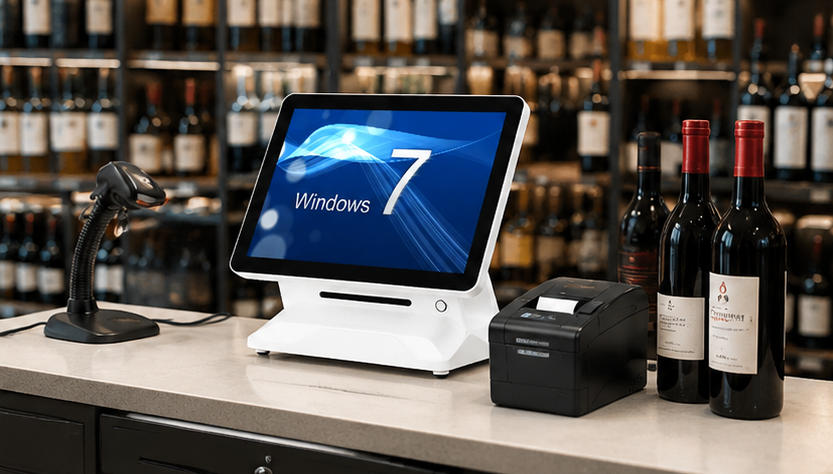
A liquor store POS is a combination of hardware and software used to process sales and support store operations. The hardware normally includes a touchscreen terminal, barcode scanner, receipt printer, cash drawer, payment terminal, and optional customer-facing display.
The software manages functions such as:
Product and price databases
Inventory tracking
Age-verification prompts
Employee permissions
Discounts and promotions
Customer loyalty programs
Purchase orders
Sales reporting
Multi-location management
Although the software determines the available management features, the hardware determines how quickly and reliably employees can use those features.
Retailers, software companies, distributors, and system integrators can explore the AONPOS POS system range when evaluating all-in-one touchscreen terminals for liquor store projects.
Liquor stores have several operational characteristics that make reliable POS hardware particularly important.
A medium-sized liquor store may carry beer, wine, spirits, mixers, snacks, tobacco products, gift sets, and seasonal merchandise. Many categories include dozens or hundreds of variations based on brand, bottle size, vintage, flavor, package quantity, or alcohol content.
Cashiers cannot search manually for every product. A fast barcode scanner is necessary to identify items immediately and add them to the transaction accurately.
Demand often increases during evenings, weekends, holidays, sporting events, and local celebrations. Slow terminals or unreliable scanners can quickly create long queues.
The POS terminal must respond smoothly when cashiers scan multiple products, apply promotions, check identification, accept payment, and print receipts in rapid succession.
Liquor retailers must follow the applicable age-verification rules in their market. The POS software may display age prompts, record confirmation, or integrate with an ID-reading device.
The hardware therefore needs sufficient USB, serial, or other compatible connections for any verification equipment required by the store’s software and operating procedures.
Liquor retailers often purchase products by the case but sell them as individual bottles, packs, or full cases. Their POS software may need to recognize relationships between different package sizes and inventory units.
Accurate barcode scanning and stable system performance help ensure each transaction is recorded correctly. This gives the inventory platform better data for reordering, stock counts, shrinkage analysis, and category management.
Discounts may include mix-and-match offers, case pricing, member pricing, quantity discounts, seasonal packages, and supplier-funded promotions.
A responsive touchscreen helps employees find promotions, verify conditions, and make corrections without delaying the customer.
A complete checkout station normally contains several connected components. Each device should be selected according to the store’s transaction volume, counter layout, software platform, and expansion plans.

The terminal is the central component of the liquor store POS. It runs the retail application and connects to scanners, printers, displays, payment equipment, and other peripherals.
An all-in-one terminal combines the computer, touchscreen, and mounting structure in one device. This arrangement uses less counter space and creates a cleaner installation than a traditional computer with a separate monitor and system unit.
For most liquor stores, a 15-inch or 15.6-inch capacitive touchscreen provides a practical balance between visibility and counter-space efficiency. Cashiers can view product information, transaction totals, discount controls, and payment options without navigating an excessively crowded interface.
When comparing terminals, evaluate:
Processor options
RAM capacity
SSD storage
Screen size and resolution
Touch technology
Operating-system compatibility
Number and type of I/O ports
Network connectivity
Cooling design
Stand stability
Service accessibility
AONPOS offers models with different processor, memory, storage, screen, and single- or dual-display configurations within its all-in-one POS terminal collection. Buyers should match these specifications to the requirements published by their POS software provider.
The barcode scanner is one of the most frequently used devices in a liquor store. It should read labels quickly even when bottles are curved, reflective, damaged, wet, or positioned at an awkward angle.
A basic handheld scanner may be sufficient for a small specialty shop with moderate traffic. Higher-volume stores may benefit from an omnidirectional presentation scanner that allows employees to move bottles past the scanning window without carefully aligning each barcode.
Important scanner considerations include:
Support for common 1D and 2D barcode formats
Scan speed
Reading distance
Ability to read damaged or low-contrast labels
USB or serial connectivity
Handheld and hands-free operating modes
Stand design
Drop resistance
Compatibility with the POS software
Retailers should test scanners with real products from their inventory. A demonstration using perfect labels on flat cartons may not accurately represent performance on glossy wine bottles or refrigerated products.
A thermal printer produces customer receipts without ink cartridges or ribbons. It is widely used in retail because it is fast, compact, and relatively easy to maintain.
For a liquor store POS, printer speed matters during busy periods. The printer should also include a reliable auto-cutter and support the paper width required by the software.
Check the following before purchasing:
Printing speed
Paper width
Auto-cutter service life
USB, LAN, Bluetooth, or serial interface
Driver availability
Operating-system compatibility
Cash-drawer port
Paper-loading design
Access for routine maintenance
Because the printer is a mechanical device, it may require more maintenance than the touchscreen terminal. Keeping spare paper and, for busy locations, access to a backup printer can reduce the operational impact of a failure.
The AONPOS article on thermal printer troubleshooting can also support a broader internal maintenance knowledge base.
Although card and mobile payments continue to expand, many liquor stores still accept cash. A commercial cash drawer should provide enough compartments for the local currency and withstand repeated opening throughout the day.
Most POS cash drawers connect to the receipt printer and open automatically when the software completes an eligible transaction. The drawer should also have a physical key for authorized manual access.
Consider:
Drawer dimensions
Number of bill and coin compartments
Metal construction
Lock quality
Printer compatibility
Cable connection
Under-counter mounting options
Removable cash tray
Emergency key operation
Stores with limited counter space can mount the drawer beneath the counter, provided the installation remains comfortable and secure for employees.
A customer display shows scanned items, prices, discounts, taxes, and transaction totals. This visibility allows customers to identify errors before payment and can improve trust at checkout.
Liquor stores can choose between a compact numerical display and a larger second screen. A full customer-facing display may also present loyalty information, promotional content, or digital receipts, depending on the software.
A dual-screen POS is especially useful when the retailer wants a modern checkout experience or additional space for marketing. However, a single-screen terminal may be more economical for a small store with limited counter space.
The comparison between single-screen and dual-screen POS systems can help buyers determine which layout better fits their project.
The payment terminal processes credit cards, debit cards, contactless cards, and mobile-wallet transactions. In many projects, payment devices are supplied or approved by the payment processor rather than the POS hardware manufacturer.
Before deploying the checkout station, confirm how the payment terminal communicates with the POS software. The integration may use USB, Ethernet, Bluetooth, Wi-Fi, or a cloud-based connection.
Important issues include:
Payment-processor certification
Software integration
Contactless-payment support
PIN entry
Cable management
Countertop or customer-facing placement
Regional security requirements
Network stability
The POS computer and payment terminal should be treated as separate parts of the complete checkout environment. Selecting a powerful POS terminal does not automatically guarantee compatibility with every payment device.
Depending on local regulations and the features of the liquor store software, an ID scanner may help employees read information from a driver’s license or other supported identification document.
An ID scanner does not replace employee responsibility or applicable legal procedures. It is simply a tool that may support faster and more consistent verification.
Before selecting one, verify:
Which identification formats it reads
Whether it is supported by the POS application
How customer data is handled
Which connection interface it requires
Whether employee confirmation is still necessary
Whether local privacy and retention rules apply
Businesses should obtain appropriate legal and compliance guidance for their market rather than assuming that a hardware feature alone satisfies regulatory requirements.
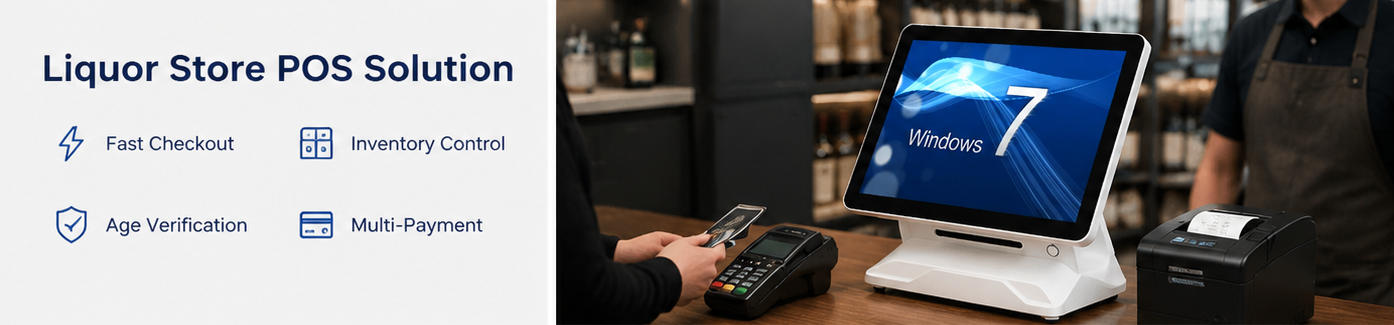
Beyond the individual devices, several technical characteristics influence the reliability of the overall system.
The terminal may need to connect simultaneously to a scanner, printer, cash drawer, customer display, payment terminal, keyboard, scale, ID reader, or other accessories.
Create a complete peripheral list before ordering hardware. Confirm the quantity of USB, serial, LAN, video, audio, and cash-drawer connections required.
Using an external USB hub may be acceptable for low-priority devices, but critical peripherals should preferably connect directly to reliable terminal ports.
Cloud-based POS software requires dependable internet connectivity. Ethernet is usually the most stable option for a fixed checkout terminal, while Wi-Fi provides installation flexibility.
A liquor store should also determine what happens when the internet connection fails. Some software platforms can continue processing limited transactions offline, while others depend heavily on continuous cloud access.
The hardware configuration should support the store’s network design and software recovery procedures.
Consumer tablets and computers may appear economical, but they are not always designed for long operating hours, frequent touching, repeated peripheral connections, or a fixed retail counter.
A commercial liquor store POS should have a stable stand, durable touchscreen, appropriate ventilation, reliable internal components, and accessible ports.
Liquor stores also need sensible placement. The equipment should be protected from spills, direct heat, unstable surfaces, excessive dust, and areas where heavy bottles could strike the screen.
Before ordering terminals, obtain the software provider’s recommended hardware specifications. Confirm:
Supported operating system
Minimum processor performance
Required RAM
Storage requirement
Display resolution
Touchscreen support
Required ports
Printer drivers
Scanner compatibility
Payment integration
Customer-display support
The beginner’s guide to operating a POS system provides an overview of how the main hardware components work together during a retail transaction.
Liquor store counters can collect dust, moisture, label residue, and packaging debris. A flat touchscreen surface is generally easier to clean than a design with deep bezels or unnecessary gaps.
Cable routing should also allow technicians to identify and replace devices without dismantling the complete counter.
Documenting port assignments, cable labels, driver versions, and device settings can make troubleshooting faster, especially for multi-location deployments.
A single independent store may only need one or two checkout stations. Its priorities are usually affordability, simple installation, easy maintenance, and compatibility with the selected software.
A growing chain has additional requirements:
Standardized hardware configurations
Consistent peripheral models
Central device documentation
Remote software support
Replacement-unit availability
Predictable imaging and deployment
Branded enclosures or packaging
Spare-parts planning
Stable production across multiple orders
Standardization reduces the number of drivers, cables, replacement components, and troubleshooting procedures that the operator must manage.
For distributors, software vendors, and retail solution providers, OEM/ODM capability may also be important. A customized terminal can incorporate branding, selected components, interface requirements, packaging, and other project-specific details.
AONPOS describes itself as an ODM/OEM manufacturer focused on touch POS terminals, printers, scanners, cash drawers, and related checkout equipment. Buyers can learn more through the AONPOS company page.
The terminal, printer, scanner, and payment device must be compatible with the software. Selecting attractive hardware first can lead to costly integration problems later.
The lowest initial price may not provide the best total value. Consider downtime, replacement availability, warranty support, device lifespan, and employee productivity.
A terminal may appear suitable until the installer discovers that it cannot connect all required devices. Count every peripheral and confirm the exact interface type.
Retail software, reporting tools, customer displays, and background synchronization can place increasing demands on the terminal. Choose specifications that support current use and reasonable future growth.
A sample unit should be tested with the actual software, bottles, barcodes, receipt format, payment equipment, and network environment before a larger order is approved.
Every store needs a response plan for terminal, printer, scanner, network, or power failure. Spare equipment and documented recovery procedures can prevent a minor technical issue from stopping sales.
AONPOS focuses on POS hardware rather than tying buyers to one proprietary liquor-store software platform. This approach can be useful for software developers, system integrators, distributors, and retailers that already have a preferred application.
The product range includes single-screen and dual-screen all-in-one terminals with various processor, memory, storage, and display configurations. AONPOS also manufactures related checkout equipment and supports OEM/ODM requirements for commercial projects.
Potential customization requirements may include:
Brand logos
Housing colors
Processor selection
RAM and storage configuration
Customer-facing displays
Port layouts
Operating-system installation
Packaging
Peripheral bundles
Deployment-specific testing
Project buyers should provide a detailed requirement document that includes software specifications, expected transaction volume, peripheral list, network environment, target market, certifications, quantities, and delivery schedule.
Before purchasing a liquor store POS, confirm that the proposed configuration provides:
A responsive commercial touchscreen
Adequate processor, memory, and storage
Compatible operating-system support
Enough ports for every peripheral
Reliable barcode scanning
Fast thermal receipt printing
Secure cash handling
Payment-terminal compatibility
Optional customer display support
Optional ID-scanner integration
Stable Ethernet or Wi-Fi connectivity
Easy maintenance and cable access
Spare-unit and replacement planning
Software compatibility verification
OEM/ODM options when required
The right liquor store POS should support fast transactions, accurate scanning, dependable printing, clear customer communication, and stable operation throughout the business day.
A successful project starts with the software requirements and builds the hardware configuration around them. Retailers should evaluate the touchscreen terminal, barcode scanner, printer, cash drawer, customer display, payment equipment, connectivity, and expansion needs as one complete system.
For independent stores, dependable all-in-one hardware can simplify checkout and reduce counter clutter. For chains, distributors, and software providers, standardized configurations and OEM/ODM support can make deployment and long-term maintenance more manageable.
By testing compatibility before rollout and choosing commercial equipment designed for retail use, businesses can build a liquor store POS environment that remains reliable as transaction volume, product range, and store locations grow.
Tel / Whatsapp : +86 -15999943922
بريد إلكتروني : nikki@aonpostech.com


© 2026 شنتشن Aonpos التكنولوجيا المحدودة .كل الحقوق محفوظة