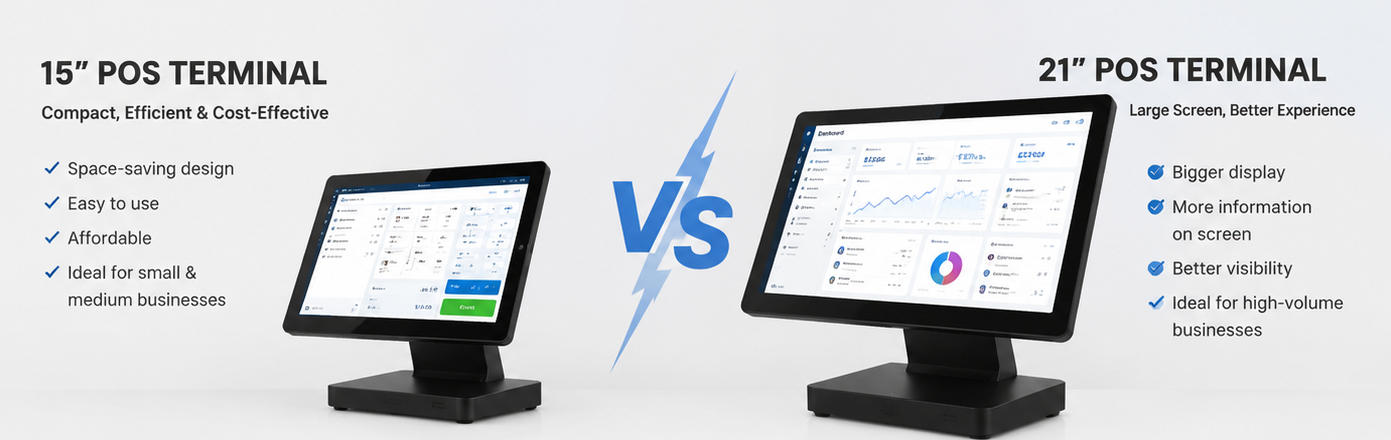
15-inch vs 21-inch POS Terminal: How to Choose the Right Size for Your Business?
Aug 04, 2026
Introduction: Choosing the Right POS Screen Size Matters
In today’s competitive retail and hospitality industries, a POS terminal is more than just a payment device. It is the central hub that connects transactions, inventory management, customer interaction, and business operations. When selecting POS hardware, one of the most important decisions businesses and system integrators need to make is choosing the right display size.
Among professional POS solutions, 15-inch POS terminals and 21-inch POS terminals are two of the most widely adopted options. Both sizes offer reliable performance, touchscreen functionality, and commercial-grade durability, but they are designed for different operating environments.
A smaller 15-inch POS terminal is often preferred for compact counters, restaurants, convenience stores, and businesses that prioritize space efficiency. Meanwhile, a larger 21-inch POS terminal provides a more immersive interface, improved visibility, and better usability for applications requiring more information display.
For POS brands, distributors, and businesses looking for customized hardware solutions, understanding the differences between these two terminal sizes is essential for selecting the right product configuration.
As a professional POS hardware manufacturer, AONPOS provides a wide range of customizable POS terminals designed for retail, restaurant, and commercial applications. Choosing the correct screen size helps businesses improve workflow efficiency while maximizing return on investment.
Understanding 15-inch POS Terminals
A 15-inch POS terminal is one of the most popular configurations in traditional retail and hospitality environments. Its compact footprint makes it suitable for businesses where counter space is limited but reliable touchscreen operation is required.
Most 15-inch POS terminals feature:
15-inch projected capacitive (PCAP) touchscreen
Fanless industrial design
Multiple I/O interfaces
Support for Windows or Android operating systems
Integration with barcode scanners, printers, and payment devices
The smaller display size allows employees to operate the system quickly without excessive screen movement. For many businesses, a 15-inch terminal provides the ideal balance between usability and space efficiency.
For example, small restaurants, cafes, bakeries, and boutique retailers typically have limited checkout counter areas. Installing a large terminal may reduce available workspace for printers, cash drawers, or customer-facing displays. In these cases, a compact 15-inch POS terminal can deliver excellent operational performance while maintaining a clean countertop layout.
Businesses looking for reliable commercial touchscreen solutions can explore AONPOS’s range of touchscreen POS terminals designed for various retail and hospitality applications.
Advantages of 15-inch POS Terminals
1. Space-Saving Design
The biggest advantage of a 15-inch POS terminal is its compact size.
Retail counters are often crowded with multiple devices, including:
Receipt printers
Cash drawers
Barcode scanners
Customer displays
Payment terminals
A smaller POS system allows businesses to maximize available counter space while maintaining an efficient checkout workflow.
This makes 15-inch terminals particularly suitable for:
Convenience stores
Coffee shops
Small restaurants
Beauty salons
Specialty stores
2. Faster Employee Adaptation
A smaller touchscreen interface is easier for employees to navigate because all major functions are within a closer viewing area.
For businesses with frequent employee turnover, such as restaurants and retail stores, a simple and efficient interface can reduce training time.
Employees can quickly access:
Product menus
Order information
Payment options
Inventory functions
This improves transaction speed and reduces operational errors.
3. Lower Hardware Cost
Compared with larger POS terminals, 15-inch models generally require fewer materials and smaller displays, making them a more cost-effective option.
For businesses deploying multiple checkout stations, choosing a 15-inch POS terminal can significantly reduce initial hardware investment.
For POS solution providers and distributors, compact terminals also provide flexibility when creating affordable POS packages for different markets.
Understanding 21-inch POS Terminals
A 21-inch POS terminal represents a larger and more advanced category of commercial POS hardware. With a significantly larger touchscreen area, it provides more space for software interfaces, product images, dashboards, and multi-function applications.
A 21-inch POS terminal is commonly used in environments where visual clarity and operational efficiency are priorities.
Typical applications include:
Large restaurants
Supermarkets
Department stores
Fashion retailers
High-volume retail chains
The larger display allows employees to view more information simultaneously, reducing the need to switch between multiple screens.
For example, restaurant operators can display larger menu layouts with product images, modifiers, and order details. Retail stores can show more inventory information and customer management features on a single screen.
AONPOS provides customizable commercial POS hardware solutions for businesses requiring different screen sizes, performance levels, and industrial designs.
Advantages of 21-inch POS Terminals
1. Better User Experience
The larger screen provides a more comfortable operating experience, especially during long working hours.
Employees can easily view:
Larger product categories
Detailed order information
Multiple application windows
Inventory dashboards
This is especially valuable in industries where employees interact with the POS system continuously throughout the day.
2. Improved Software Compatibility
Modern POS software is becoming increasingly feature-rich. Many systems now include:
Customer relationship management
Inventory analytics
Employee management
Loyalty programs
Digital menu interfaces
A larger screen provides more room for these advanced functions.
For businesses using sophisticated POS software platforms, a 21-inch terminal can improve productivity by reducing screen switching.
3. Ideal for High-Volume Operations
In busy environments, every second matters.
Large retailers and restaurants often process hundreds or thousands of transactions daily. A bigger interface allows employees to work faster and more accurately.
Industries that benefit from 21-inch POS terminals include:
Supermarkets
Chain restaurants
Large retail stores
Hospitality businesses
The additional screen space improves workflow efficiency during peak business hours.
15-inch vs 21-inch POS Terminal: Key Differences
Feature
15-inch POS Terminal
21-inch POS Terminal
Screen Size
Compact
Large
Counter Space
Minimal footprint
Requires more space
Cost
More affordable
Higher investment
User Interface
Simple and efficient
More information display
Best For
Small and medium businesses
High-volume operations
Installation
Easy in limited spaces
Requires larger counters
Software Experience
Standard POS applications
Advanced POS platforms
Which POS Terminal Size Is Better for Your Business?
There is no universal answer because the best choice depends on business requirements.
Choose a 15-inch POS Terminal If:
A 15-inch model is recommended when:
Counter space is limited
The business operates a small checkout area
Budget efficiency is important
Employees mainly perform standard transactions
Multiple POS stations are required
Examples:
Cafes
Small retailers
Convenience stores
Beauty salons
Bakeries
For these environments, a compact POS terminal provides excellent value without sacrificing essential functionality.
Choose a 21-inch POS Terminal If:
A 21-inch model is a better choice when:
Employees need more screen visibility
The POS software has complex interfaces
Product information is extensive
The business handles high transaction volumes
Customer interaction is important
Examples:
Supermarkets
Large restaurants
Shopping malls
Chain stores
The additional screen size can improve employee efficiency and create a more professional checkout experience.
Consider More Than Screen Size When Selecting POS Hardware
Although display size is important, businesses should evaluate the complete hardware configuration.
Important factors include:
Processor Performance
A powerful processor ensures smooth operation when running modern POS software.
Touchscreen Quality
Commercial POS systems require durable touchscreens that can handle continuous daily use.
Connectivity Options
Professional POS terminals should support:
USB ports
LAN connection
Serial interfaces
Multiple peripherals
Industrial Reliability
Retail and hospitality environments require hardware designed for long working hours.
This is why businesses often choose professional manufacturers instead of consumer-grade computers.
AONPOS specializes in developing durable POS hardware solutions that support different industries and customization requirements.
OEM and ODM Considerations: Choosing the Right POS Size for Your Product Line
For POS brands, distributors, and software companies, selecting the right terminal size is also a product strategy decision.
A balanced POS product portfolio often includes multiple screen sizes:
15-inch models for compact applications
17-inch models for standard retail environments
21-inch models for premium and enterprise customers
Offering different sizes allows businesses to serve more customers across different industries.
Through OEM and ODM cooperation, manufacturers can customize:
Screen sizes
Housing designs
Processor configurations
Branding options
Interface layouts
Working with an experienced POS hardware partner allows companies to develop products that match specific market requirements.
AONPOS supports global partners with professional OEM/ODM POS hardware manufacturing services, helping brands create customized POS terminals for different industries.
Final Thoughts: 15-inch or 21-inch POS Terminal?
The choice between a 15-inch and 21-inch POS terminal depends mainly on business size, workspace availability, software requirements, and customer experience goals.
A 15-inch POS terminal delivers excellent efficiency, affordability, and space-saving advantages, making it ideal for small and medium businesses.
A 21-inch POS terminal provides a larger interface, better visibility, and stronger support for advanced applications, making it suitable for high-volume retail and hospitality environments.
For businesses, distributors, and POS solution providers, selecting the right terminal size is not simply about choosing a larger screen. It is about matching hardware capability with real operational needs.
As a professional POS hardware manufacturer, AONPOS helps global partners select and customize reliable POS terminals that improve business efficiency and support long-term growth.
Whether you need compact POS terminals for small businesses or large-screen solutions for enterprise applications, choosing the right hardware configuration is the foundation of a successful POS system.