
POS for Beauty Salons: How to Choose the Right Salon POS Hardware
Jul 21, 2026Running a successful beauty salon requires much more than delivering excellent hair, nail, skincare, or spa services. Salon owners must coordinate appointments, manage employees, sell retail products, process payments, track commissions, and create a smooth experience for every client.
At the center of these daily activities is the salon POS system.
A modern salon POS combines specialized software with reliable hardware to help beauty businesses manage transactions and front-desk operations efficiently. While salon management software controls functions such as booking, client profiles, loyalty programs, and reporting, the POS hardware provides the physical platform employees use throughout the working day.
Choosing the right salon POS hardware can improve checkout speed, reduce front-desk errors, support product sales, and create a more professional customer experience. This guide explains the essential components, features, configurations, and purchasing considerations for beauty salons, spas, nail studios, barbershops, and multi-location beauty businesses.
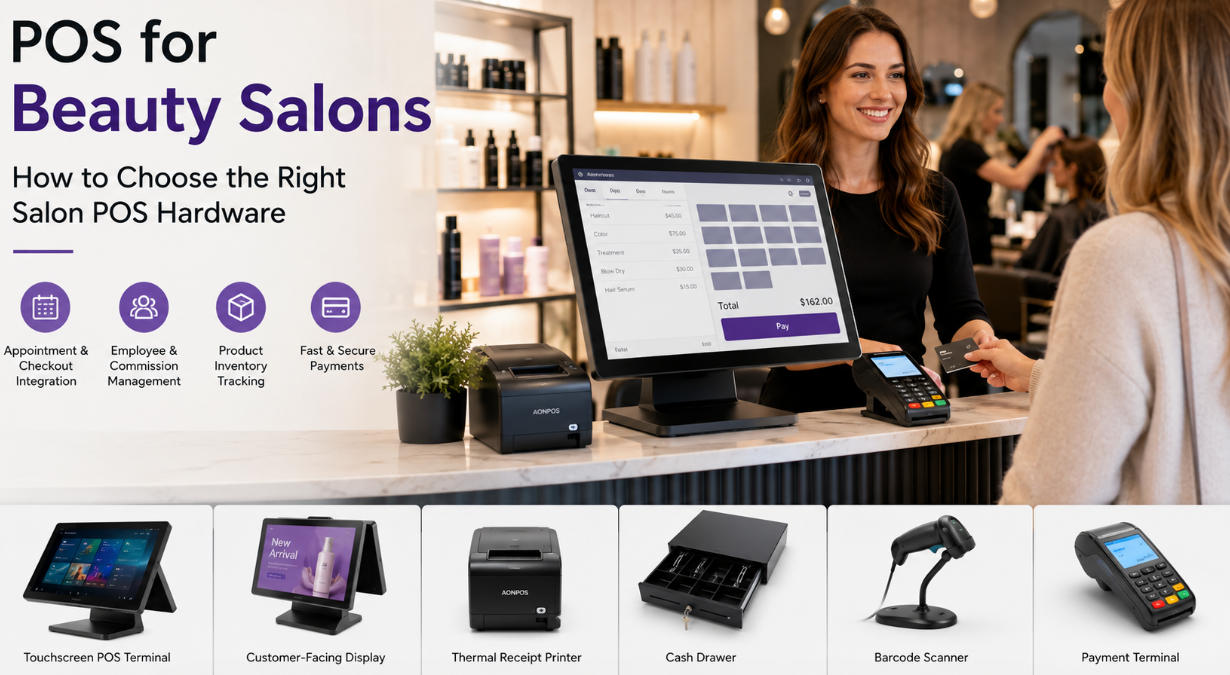
A beauty salon does not operate like a conventional retail store. A typical transaction may include several services, multiple employees, a client discount, a product purchase, a membership benefit, and a gratuity.
For example, one customer might pay for a haircut, hair coloring, a conditioning treatment, and two retail products. Different team members may have delivered the services, requiring the system to allocate revenue or commissions correctly.
The checkout station must therefore support a more complex workflow than simply scanning an item and accepting payment.
A suitable salon POS helps employees:
Find appointments quickly
Add services and products to one transaction
Apply packages, memberships, or promotions
Assign services to specific employees
Accept different payment methods
Process deposits and gift cards
Record tips where supported by the software
Print or send receipts
Schedule the customer’s next appointment
Reliable hardware is especially important during busy periods. When several clients finish their appointments at the same time, slow or unstable equipment can create congestion around the reception desk. A responsive touchscreen and properly configured peripherals help the team complete transactions without disrupting the salon atmosphere.
The terminal is the central part of the salon POS setup. It runs the salon’s selected software and connects to payment devices, printers, scanners, displays, and other peripherals.
Touchscreen operation is particularly useful in beauty environments because employees can select appointments, services, products, and payment options directly from visual menus. This can reduce keyboard use and make staff training easier.
A salon terminal should ideally offer:
A responsive capacitive touchscreen
Sufficient processing power for the selected software
SSD storage for faster startup and operation
Multiple USB ports
Ethernet and optional Wi-Fi connectivity
Support for a receipt printer and cash drawer
A stable stand suitable for frequent daily use
An easy-to-clean exterior
Screen size also matters. Compact salons may prefer a 12-inch or 14-inch device, while busy reception areas can benefit from a 15-inch or 15.6-inch display that gives staff more room to view appointments and transaction details.
A model such as the AONPOS touch capacitive point-of-sale computer offers a 15-inch capacitive touchscreen and selectable processor, memory, and storage configurations. AONPOS also supports OEM and ODM requirements for distributors and solution providers.
Beauty clients increasingly expect to pay by credit card, debit card, mobile wallet, or contactless payment. The payment terminal should integrate smoothly with the salon software whenever possible.
Integrated payments can automatically transfer the transaction amount from the POS to the payment device. This reduces manual entry, lowers the risk of typing errors, and helps keep payment records aligned with sales reports.
Before selecting a terminal, confirm:
Which payment providers the software supports
Whether the device accepts contactless payments
Whether tip prompts are available where appropriate
Whether receipts can be printed or delivered digitally
Whether the device meets local payment-security requirements
Payment hardware and processing contracts are often supplied separately from the main POS computer, so buyers should verify compatibility before placing a hardware order.
Although many salons now provide email or SMS receipts, a thermal receipt printer remains useful for customers who prefer printed documentation.
Thermal printers are generally suitable for salon environments because they are compact, fast, and do not require ink cartridges. Buyers should check the printer’s connection type, paper width, print speed, driver support, and compatibility with the selected salon POS software.
The printer should also fit neatly into the reception counter without creating unnecessary cable clutter.
Even salons that primarily accept digital payments may still need a cash drawer. It should be durable, secure, and sized according to the salon’s available counter space and expected cash volume.
Many cash drawers connect to the receipt printer and open automatically when a cash transaction is completed. Managers should also ensure that the software provides employee permissions, cash-counting procedures, and shift reports to support accountability.
Beauty salons frequently sell shampoo, conditioner, styling products, nail care products, cosmetics, skincare items, brushes, and other accessories.
A barcode scanner allows reception staff to add these products to a transaction without searching through a long product list. This can speed up checkout and reduce mistakes, particularly when similar products have different sizes, formulas, or prices.
Retail-heavy salons may benefit from an omnidirectional scanner, while a basic handheld scanner may be enough for a smaller product selection.
A customer display gives clients a clear view of services, products, discounts, taxes, and the final amount before payment. It may also show membership reminders, promotional images, product advertisements, or loyalty-program messages when supported by the software.
This can be especially valuable in salons because transactions often include multiple services and products. Giving clients the ability to review the sale can improve transparency and reduce misunderstandings.
A dual-screen terminal provides a larger and more integrated customer-facing experience than a basic numeric display. The AONPOS guide to dual-screen versus single-screen POS systems explains how the two configurations differ in footprint, customer interaction, and promotional capability.
The most important salon-specific capability is the connection between the appointment calendar and the checkout screen.
When a client finishes a service, the receptionist should be able to open the appointment, confirm the services performed, add products, apply discounts, and accept payment without rebuilding the transaction from the beginning.
This workflow can save time and reduce the chance of missing services or assigning revenue to the wrong team member.
Many salons use commission-based compensation, booth rental, hourly pay, or a combination of these structures. The salon POS software may need to identify which employee performed each service and who sold each retail product.
The hardware must be responsive enough to handle employee switching, permission controls, detailed service menus, and reporting functions without noticeable delay.
Because these capabilities depend primarily on software, salon owners should select their management platform first and then confirm the hardware requirements.
Client records help beauty professionals deliver personalized service. Depending on the software, profiles may include previous appointments, formulas, preferred products, allergies, notes, membership status, and purchase history.
A large, clear touchscreen makes it easier for authorized employees to access these details. However, salons must also use passwords, employee permissions, screen-locking procedures, and appropriate data-protection practices to keep customer information secure.
Retail products can provide an important additional revenue stream. The salon POS should help track quantities, low-stock levels, supplier information, sales performance, and product movement.
Hardware requirements may include a barcode scanner, receipt printer, label printer, or additional back-office workstation. Multi-location salons may also need reliable network connectivity so product data can be synchronized between branches.
Many salons sell monthly memberships, prepaid treatment packages, loyalty rewards, and gift cards. These programs can improve retention and generate recurring revenue, but they also make transactions more complex.
The checkout interface should allow staff to identify eligible benefits, apply package balances, redeem gift cards, and explain remaining value clearly to the client.
A customer-facing display can make this process more transparent by showing how the final total was calculated.
Both formats can work well, depending on the salon’s size and operating model.
A single-screen salon POS is often suitable for:
Independent stylists
Small hair or nail salons
Beauty studios with limited counter space
Businesses with lower transaction volume
Salons that primarily use digital receipts
Its main advantages are a smaller footprint, simpler installation, fewer cables, and a lower initial hardware cost.
The AONPOS all-in-one POS selection includes compact terminals with different screen sizes and hardware specifications, allowing buyers to match the device to their software and workspace.
A dual-screen salon POS is more suitable for:
Busy reception areas
Premium salons and spas
Businesses with strong retail product sales
Membership-focused beauty brands
Multi-location salon chains
Salons that want to display promotions at checkout
The employee uses the main touchscreen while the client views transaction information on the second display. Depending on software support, the customer screen may also show digital advertisements, loyalty messages, or service recommendations.
Dual-screen configurations can make the reception area feel more modern while creating another opportunity to promote products and future appointments.
POS hardware should never be selected without checking the software requirements. Some salon platforms run through a web browser, while others require Windows, Android, iOS, or a proprietary device.
Confirm the supported operating system, processor, memory, storage, screen resolution, ports, and peripheral drivers before ordering.
The beginner’s guide on how to operate a POS system provides a useful overview of how terminals, printers, scanners, cash drawers, and payment devices work together.
Measure the counter before choosing the terminal. Consider the base dimensions, screen movement, cable exits, receipt printer, payment device, scanner, and cash drawer.
A salon reception area should remain tidy and welcoming. An oversized setup or poorly organized cables can make a premium interior look cluttered.
An all-in-one terminal reduces the number of separate components on the counter and can simplify installation.
Salon equipment may operate for long hours every day. Consumer tablets and home computers may appear affordable, but they are not always designed for continuous commercial use or frequent peripheral connections.
Look for:
A stable metal or reinforced stand
Durable touchscreen construction
Reliable internal cooling
Commercial-grade ports and connectors
Easy access for maintenance
Long-term component availability
The objective is not simply to buy the lowest-cost terminal. It is to reduce interruptions and achieve a lower total cost of ownership over the hardware’s working life.
A salon POS may need to connect to cloud software, payment services, printers, scanners, customer displays, and back-office systems.
Useful connectivity options include:
USB
Ethernet
Wi-Fi
Bluetooth
Serial ports
Cash-drawer ports
Video outputs for secondary displays
Ethernet is generally preferable for the main reception terminal because it provides a stable connection. Wi-Fi can be valuable as a backup or for flexible device placement.
A small salon may later add more styling stations, open another branch, introduce memberships, or increase retail sales. Selecting scalable hardware can reduce the need for an early replacement.
Buyers should consider whether the terminal can support:
Additional memory or storage
A second display
More USB peripherals
New payment hardware
Multi-location software
Updated operating-system requirements
For resellers, software companies, and salon solution providers, custom branding and configuration may also be important. AONPOS manufactures all-in-one touch terminals, touch monitors, kiosks, printers, scanners, and related POS peripherals, with OEM and ODM services for international partners.
A practical setup may include:
One compact touchscreen terminal
One integrated payment device
One thermal receipt printer
One cash drawer
Optional handheld barcode scanner
This configuration keeps the counter simple while supporting appointments, service checkout, payments, and a small retail inventory.
A higher-volume salon may benefit from:
A 15-inch all-in-one POS terminal
A customer-facing display
Integrated card and contactless payments
A high-speed thermal printer
A durable cash drawer
An omnidirectional barcode scanner
Wired network connectivity
A backup device or second reception station
This configuration is appropriate when several employees, service categories, memberships, and retail products must be managed at the same time.
A salon chain may require standardized hardware across every branch. Standardization simplifies employee training, technical support, software deployment, spare-parts management, and future upgrades.
Businesses sourcing terminals in volume should evaluate supplier consistency, quality-control processes, configuration options, branding, packaging, export experience, and long-term availability.
The AONPOS B2B POS buyer guide provides additional guidance for distributors, system integrators, and businesses purchasing configurable commercial POS hardware.
AONPOS focuses on the development and production of commercial POS hardware rather than salon management software. Its product portfolio includes all-in-one touchscreen terminals, dual-screen systems, touch monitors, handheld devices, thermal printers, barcode scanners, and other checkout peripherals.
The company’s terminal range includes selectable processors, memory capacities, storage options, screen formats, and peripheral configurations. This flexibility can be useful for salon software vendors, distributors, system integrators, and beauty brands that require hardware matched to a specific application.
OEM and ODM capabilities can also support:
Custom logos and enclosure branding
Selected processor and memory configurations
Single-screen or dual-screen designs
Windows or Android deployment requirements
Customized packaging
Peripheral bundles
Bulk purchasing projects
A portable device such as the AONPOS S600 handheld POS may also support mobile transaction scenarios where compatible payment functions and software are available.
Salon operators and solution providers can explore the wider product portfolio through the AONPOS official website.
The best salon POS is not simply the most powerful or expensive system. It is the system that fits the salon’s software, services, transaction volume, counter space, payment workflow, and plans for growth.
A small beauty studio may only require a compact touchscreen and payment terminal. A busy full-service salon may benefit from a dual-screen workstation, barcode scanner, customer display, and integrated payment setup. A multi-location brand may prioritize standardized hardware, remote management, reliable supply, and OEM customization.
Before purchasing, salon owners should confirm software compatibility, operating-system requirements, peripheral support, connectivity, and available counter space. They should also consider long-term reliability rather than focusing only on the initial price.
With the right hardware foundation, a salon POS can help reception teams process transactions faster, support product sales, improve payment transparency, and deliver the polished customer experience that modern beauty clients expect.
Tel / Whatsapp : +86 -15999943922
بريد إلكتروني : nikki@aonpostech.com


© 2026 شنتشن Aonpos التكنولوجيا المحدودة .كل الحقوق محفوظة