
Electronics Store POS Hardware Guide: How to Choose the Right System
Jul 14, 2026Electronics retail is more complex than ordinary product checkout. A typical electronics store may sell smartphones, computers, accessories, home appliances, replacement parts, warranties, installation services, and high-value products with unique serial numbers.
Because of this complexity, selecting the right electronics store POS hardware requires more than choosing a touchscreen and connecting a receipt printer. The hardware must support fast transactions, detailed inventory control, product identification, customer engagement, peripheral integration, and long-term expansion.
This guide explains the essential hardware components of an electronics retail POS system, the specifications buyers should evaluate, and how retailers, distributors, and system integrators can build a reliable checkout solution.
An electronics store POS system is a combination of hardware and software used to process transactions and manage retail operations in an electronics shop.
Depending on the software platform, the system may help a retailer:
The software handles business logic and data, while the hardware provides the physical interface through which employees and customers complete transactions.
A reliable electronics store POS hardware platform should therefore be selected according to operational requirements rather than appearance alone.
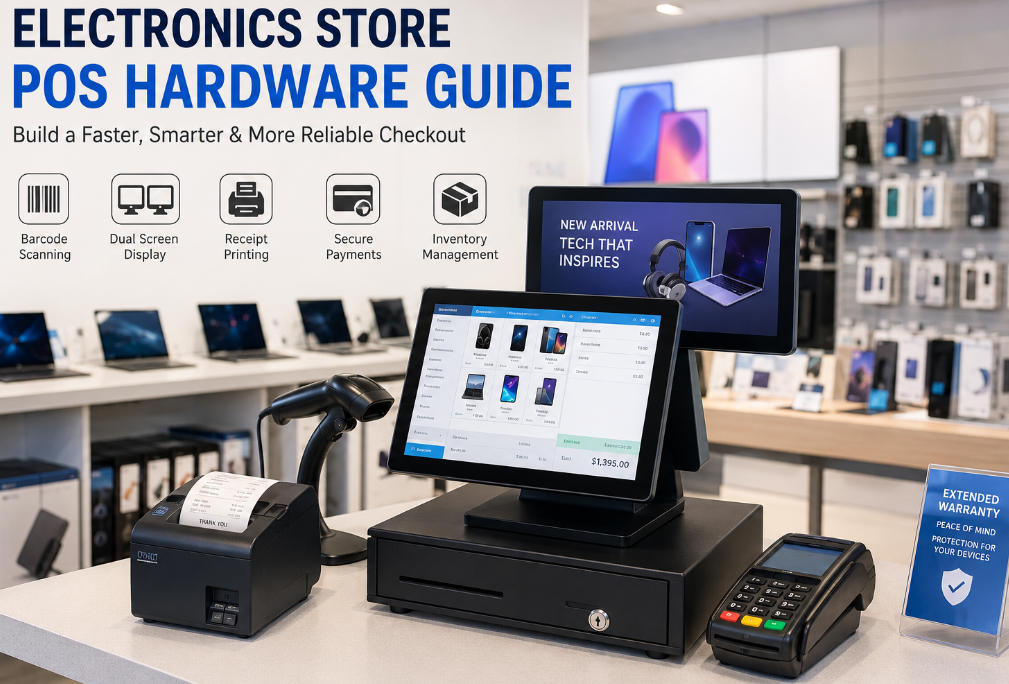
Electronics retailers face several challenges that may not be common in smaller or lower-volume retail environments.
Many electronic products have a high unit value. Inventory discrepancies, incorrect product selection, and unrecorded returns can create significant losses.
A POS terminal must work reliably with barcode scanners, inventory databases, label printers, and product-tracking applications.
Electronics stores often manage multiple models, specifications, colors, storage capacities, accessories, and warranty options.
The POS hardware must provide enough processing performance and display space for staff to search product databases and compare variations without slowing down the checkout process.
Smartphones, tablets, computers, and other devices may require unique serial number tracking. The POS setup should support scanners capable of reading the relevant barcode formats and transferring the information accurately into the retail software.
Electronics retailers frequently handle returns, repairs, exchanges, extended warranties, and after-sales service.
Employees may need to retrieve previous orders, verify product information, record serial numbers, and print service documents. A responsive touchscreen terminal and reliable peripheral connections can make these processes much more efficient.
Many electronics stores sell through physical locations, websites, marketplaces, and social commerce channels.
Although omnichannel functionality is mainly controlled by software, the POS hardware must provide the processing power, connectivity, and operating-system compatibility required to run integrated retail applications.
A complete POS station normally includes several connected components. The exact configuration depends on store size, transaction volume, product range, and software requirements.
The POS terminal is the central component of the checkout station. It runs the retail software and connects scanners, printers, cash drawers, customer displays, and payment devices.
An all-in-one terminal combines the computer, touchscreen, and enclosure into one commercial device. Compared with a traditional desktop computer, this design generally requires less counter space and creates a cleaner checkout environment.
For most electronics stores, important terminal features include:
A 15-inch or 15.6-inch screen is suitable for many standard checkout counters because it provides enough room for product search, inventory information, customer records, and transaction controls.
Businesses comparing configurations can review the AONPOS range of all-in-one POS systems, including single-screen and dual-screen hardware for different retail environments.
A barcode scanner is essential for fast and accurate product identification.
Electronics stores may need to scan:
A basic 1D scanner may be sufficient for a small accessories shop. However, a 2D area-imaging scanner is generally more versatile for electronics retail because it can read both traditional barcodes and QR codes.
For high-volume counters, a presentation scanner allows employees to move products in front of the scanner without repeatedly picking up a handheld device. A handheld scanner may still be useful when scanning larger products or labels positioned in difficult locations.
The scanner should be tested with the retailer’s actual products, software, and label formats before large-scale deployment.
A customer display improves transparency during checkout by showing product names, quantities, prices, discounts, loyalty information, and the final transaction total.
In an electronics store, the second screen can also be used for:
A dual-screen system creates opportunities for customer communication without requiring extra counter equipment.
The AONPOS product range includes commercial dual-screen terminals with configurable processors, memory, storage, and peripheral interfaces, making them suitable for retail checkout projects that require both cashier and customer interaction.
For a related comparison of checkout layouts, see this guide to POS solutions for convenience stores, which discusses practical differences between single-screen and dual-screen POS configurations.
Despite the growth of digital receipts, printed receipts remain important for electronics retailers because customers may need proof of purchase for returns, warranties, repairs, reimbursement, or business accounting.
A suitable receipt printer should offer:
Ethernet printers are useful when several terminals share network-based printing resources. USB printers are simpler for individual checkout stations.
Retailers should also consider whether they need larger documents for warranty agreements, repair orders, invoices, or delivery records. These may require an additional A4 printer.
Even stores that process a large percentage of card and mobile payments may still need a cash drawer.
The drawer should have:
The drawer should open only after an authorized transaction whenever possible. This helps improve cash control and reduces unnecessary access.
The payment terminal processes debit cards, credit cards, mobile wallets, and contactless transactions.
When selecting payment hardware, retailers should consider:
Payment requirements vary significantly by country and service provider. For this reason, retailers and system integrators should confirm local certification and processor compatibility before purchasing or importing terminals.
The payment device may operate as a separate unit or as part of an integrated POS environment.
A handheld terminal can extend POS functions beyond the fixed checkout counter.
Employees may use a mobile device to:
This is particularly useful in large electronics stores where products are displayed across several departments.
A handheld POS should provide reliable wireless connectivity, sufficient battery capacity, an ergonomic design, and compatibility with barcode-scanning applications. AONPOS also offers handheld POS terminal options for mobile retail and inventory workflows.
Electronics retailers may need to create labels for accessories, replacement parts, open-box products, repaired items, promotional pricing, or internally assembled bundles.
A barcode or label printer can support:
The required print width, resolution, printing volume, and label material should be determined before choosing a printer.
A simple pole display may be sufficient for stores that only need to show transaction totals. However, a full secondary monitor provides more opportunities for promotions, product recommendations, and customer interaction.
The choice depends on budget, counter space, marketing goals, and software support.
A small electronics accessories shop may prioritize a compact single-screen terminal, while a flagship electronics retailer may benefit from a larger dual-screen checkout station.
The appearance of a POS terminal is important, but internal specifications have a greater effect on daily performance and long-term reliability.
The processor should match the requirements of the POS software.
Entry-level processors may handle basic billing and inventory applications, while more powerful Intel Core configurations may be needed for larger databases, multiple integrations, browser-based systems, surveillance interfaces, or demanding Windows applications.
Buyers should avoid selecting a processor solely on price. Insufficient performance can lead to slower product searches, delayed reports, and employee frustration.
RAM affects the number of applications and processes the system can run efficiently.
A basic system may operate with 4 GB of RAM, but 8 GB or more is often a better choice for modern Windows-based retail software, especially when the terminal runs integrations, web applications, security tools, or multiple background services.
SSD storage is preferable to a traditional mechanical hard drive because it provides faster startup, quieter operation, and better resistance to vibration.
Storage capacity should account for:
Cloud-based systems may require less local storage, but sufficient capacity remains important for system stability and offline operation.
Electronics store checkout stations may connect many peripherals simultaneously.
Before ordering hardware, create a complete peripheral list and verify the required connections, including:
Peripheral compatibility is one of the most important parts of POS hardware selection. A terminal with insufficient ports may require adapters or hubs, creating a less reliable installation.
For a deeper technical overview, read AONPOS’s guide to the key factors in POS hardware selection.
Windows POS terminals are widely used because they support a broad range of retail software and peripherals. Android terminals can offer a streamlined and cost-effective platform for modern cloud-based applications.
The correct choice depends on:
Retailers should select the software first or evaluate the software and hardware together. Purchasing hardware before confirming operating-system compatibility can result in costly integration problems.
A fanless terminal can reduce noise and limit dust entering the enclosure. This can be beneficial in a retail environment where the terminal operates for long hours.
However, fanless hardware still requires effective thermal design. Buyers should evaluate the complete system rather than assuming every fanless terminal will provide the same performance.
The terminal should be installed with adequate ventilation and kept away from excessive heat, moisture, and direct sunlight.
Consumer computers are not always designed for continuous commercial operation.
A retail POS terminal should provide:
The stand should remain stable when employees repeatedly touch the screen, connect peripherals, or rotate the display.
Both designs can work well, but they serve different business requirements.
For electronics retail, a dual-screen terminal can be especially valuable because the second display can present relevant accessories, protection plans, membership benefits, and service options while the cashier completes the transaction.
A compact configuration may include:
The focus should be affordability, simple installation, and reliable everyday operation.
A mobile phone store may require:
Serial-number capture and warranty registration are particularly important in this environment.
A computer retailer may need:
The system may also need to manage custom computer configurations, deposits, business invoices, and service histories.
A larger store may deploy:
Scalability and standardized hardware configurations are especially important for multi-location retailers.
A visually attractive terminal is not useful if it cannot run the required POS application or connect to essential peripherals.
Confirm software, operating system, driver, and interface requirements before finalizing the hardware.
Barcode scanners, printers, cash drawers, customer displays, scales, payment terminals, and other devices may compete for a limited number of ports.
Document every connection before placing an order.
Consumer tablets and computers may appear cost-effective, but they may not be designed for continuous checkout operation, frequent touching, commercial mounting, or long-term peripheral availability.
Retail hardware eventually requires cleaning, storage replacement, cable inspection, or component servicing.
Choose equipment that allows practical maintenance without dismantling the entire checkout counter.
A lower purchase price does not always mean a lower total cost.
Downtime, replacement frequency, installation complexity, limited technical support, and incompatible peripherals can make inexpensive hardware more costly over its service life.
AONPOS focuses on the development and manufacturing of commercial POS hardware, including all-in-one touchscreen terminals, dual-screen POS systems, Android terminals, monitors, scanners, printers, kiosks, stands, and related checkout equipment.
For distributors, software companies, retail solution providers, and system integrators, AONPOS can support OEM and ODM requirements such as:
This flexibility can be valuable for businesses building a standardized electronics store POS solution for a specific market, software platform, or retail chain.
You can learn more about AONPOS and its commercial hardware capabilities on the AONPOS official website.
Before purchasing an electronics store POS system, confirm the following:
The best electronics store POS hardware is not necessarily the system with the highest specifications or the largest number of accessories. It is the configuration that matches the retailer’s software, product range, transaction volume, inventory workflow, customer-service model, and expansion plan.
A small accessories shop may only need a compact all-in-one terminal and scanner. A mobile phone retailer may prioritize serial-number capture and customer displays. A large electronics chain may require dual-screen terminals, handheld inventory devices, centralized deployment, and standardized hardware across multiple locations.
By evaluating processing performance, storage, connectivity, scanner requirements, operating-system compatibility, and commercial durability, retailers can build a faster and more reliable checkout environment.
For distributors and solution providers developing branded retail systems, AONPOS offers configurable POS hardware and OEM/ODM manufacturing support for electronics stores and other demanding retail applications.
Tel / Whatsapp : +86 -15999943922
بريد إلكتروني : nikki@aonpostech.com


© 2026 شنتشن Aonpos التكنولوجيا المحدودة .كل الحقوق محفوظة