Aonpos الكل في مكان واحد
  • POS Systems for Clothing Retailers: A Complete Guide to Smarter Fashion Store Operations
    POS Systems for Clothing Retailers: A Complete Guide to Smarter Fashion Store Operations Jul 12, 2026
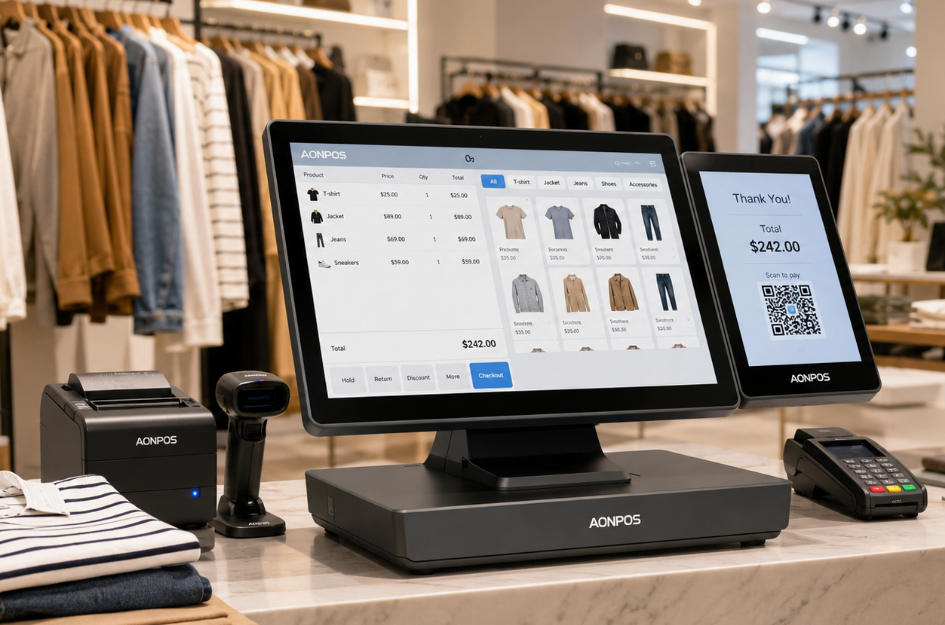
    Clothing retail is more complex than simply scanning an item and accepting payment. Fashion stores must manage products in multiple sizes, colors, styles, seasons, and locations while delivering a fast and personalized customer experience. The right POS Systems can bring these activities together in one connected retail environment. From processing transactions and managing product variants to supporting loyalty programs and omnichannel sales, a modern point-of-sale system can become the operational center of a clothing store. In this guide, we explore the essential features clothing retailers should consider when choosing a POS system, the hardware required for different fashion retail environments, and how AONPOS can support retail technology providers with customizable POS hardware. What Are POS Systems for Clothing Retailers? POS Systems for clothing retailers combine hardware and software to process sales and support daily store operations. Unlike a basic cash register, a retail POS system can connect checkout activities with inventory records, customer information, employee management, promotions, and sales reporting. A typical clothing store POS setup may include: A touchscreen POS terminal Retail POS software A barcode scanner A receipt printer A cash drawer A card or contactless payment terminal A customer-facing display A handheld inventory device Cloud-based reporting and store management tools Retailers can explore different configurations through the AONPOS POS system range, which includes all-in-one terminals designed for retail, hospitality, and other commercial environments. Why Clothing Retailers Need Specialized POS Systems Fashion retailers face inventory and customer-service challenges that are different from those of restaurants, convenience stores, and other businesses. One shirt, for example, may be available in five sizes, four colors, and several seasonal collections. Although customers see these items as variations of the same product, each variation usually requires an individual SKU and accurate stock record. Modern POS Systems help clothing retailers manage this complexity while maintaining an efficient checkout process. Managing Sizes, Colors, and Product Variants Product variation management is one of the most important requirements for a clothing store. A suitable POS system should allow retailers to organize products according to: Style Brand Size Color Material Collection Season Supplier SKU Barcode When an item is sold, returned, exchanged, transferred, or received, the system should update the correct variation rather than simply adjusting the total quantity of the general product. This level of accuracy helps prevent situations in which the system shows that a product is available while the customer’s preferred size or color is actually out of stock. Improving Checkout Speed Customers expect checkout to be quick, especially during weekends, seasonal promotions, and holiday sales. An efficient clothing retail POS station should support: Fast barcode scanning Responsive touchscreen operation Multiple payment methods Automatic promotion calculation Digital or printed receipts Customer lookup Quick exchanges and returns A commercial all-in-one POS terminal can reduce the number of separate devices on the counter and create a cleaner checkout area that fits the visual design of a modern fashion store. Supporting Returns and Exchanges Returns are a normal part of apparel retail. Customers may purchase the wrong size, change their mind about a color, or exchange an online order in a physical store. A clothing retail POS system should make it easy to: Locate the original transaction Verify the purchase Exchange one size or color for another Calculate price differences Return inventory to the correct location Issue refunds or store credit Track reasons for returns A clear returns workflow improves customer satisfaction while giving management better visibility into product quality, sizing issues, and buying patterns. Essential Features of Clothing Retail POS Systems Not every POS solution is equally suitable for fashion retail. Retailers and solution providers should evaluate both software capabilities and hardware performance before selecting a system. 1. Real-Time Inventory Management Real-time inventory visibility helps staff answer customer questions immediately. Instead of checking the stockroom manually, an employee should be able to use the POS terminal or a mobile device to confirm whether a particular size or color is available in the current store, another branch, or a warehouse. The system should also support: Low-stock notifications Purchase-order management Stock receiving Inter-store transfers Cycle counting Inventory adjustments Seasonal stock analysis For growing retailers, real-time inventory information can reduce stockouts, avoid unnecessary overstocking, and improve purchasing decisions. 2. Barcode and SKU Management Clothing retailers may handle hundreds or thousands of SKUs. Barcode support makes it easier to identify the correct item variation during checkout, stock receiving, counting, and returns. Reliable POS hardware should provide sufficient connectivity for barcode scanners, printers, customer displays, and other retail peripherals. The AONPOS AP14 retail POS terminal, for example, features a 15-inch capacitive touchscreen and configurable processing, memory, and storage options, making it suitable for different retail software requirements. 3. Customer Relationship Management Fashion purchases are often influenced by personal preferences, previous purchases, style, and brand loyalty. When connected to CRM or loyalty software, POS Systems can help retailers record useful customer information such as: Purchase history Preferred brands Common sizes Loyalty points Store credit Birthday rewards Marketing preferences Average order value Sales associates can use this information to provide more relevant recommendations and create a more personalized shopping experience. Retailers must, however, collect and use customer information responsibly and follow applicable privacy and data-protection requirements. 4. Promotion and Discount Management Fashion stores frequently run promotions based on seasons, collections, membership levels, product categories, or purchase quantities. A suitable POS platform should support promotions such as: Percentage discounts Fixed-value discounts Buy-one-get-one offers Bundle pricing Member-only pricing Coupon codes Clearance markdowns Time-limited promotions Automatic discount rules Automated promotion calculation reduces manual errors and ensures that customers receive consistent pricing across employees and store locations. 5. Omnichannel Retail Support Many clothing retailers now sell through physical stores, online shops, social platforms, and marketplaces. POS Systems can support omnichannel retail by connecting store transactions with e-commerce operations. Depending on the software platform, retailers may offer services such as: Buy online and pick up in store Buy online and return in store Ship from store Reserve online and try in store Endless-aisle ordering Unified customer profiles Shared inventory visibility For retailers evaluating the wider role of modern POS technology, the AONPOS guide to all-in-one POS systems versus traditional cash registers explains why connected POS infrastructure offers more operational capabilities than conventional cash-register hardware. 6. Multi-Store Management A clothing brand may begin with one boutique and later expand to several stores, franchise locations, or shop-in-shop counters. Scalable POS Systems should allow managers to monitor multiple locations from a central platform. Useful multi-store capabilities include: Centralized product catalogs Location-level inventory Store-to-store transfers Unified promotions Employee permissions Consolidated sales reports Location performance comparisons Central price management Retailers should choose hardware that can be standardized across locations while still accommodating different counter layouts and operating requirements. 7. Sales Reporting and Analytics POS data can help clothing retailers understand what customers are buying and how store performance changes over time. Useful reports may include: Sales by product Sales by size or color Best-selling and slow-moving items Gross margin by category Sales by employee Sales by store Return rates Discount performance Inventory turnover Hourly and daily transaction volumes These insights can support merchandising, purchasing, staffing, promotion planning, and seasonal inventory decisions. POS Hardware Required for a Clothing Store POS software is only effective when it runs on dependable commercial hardware. Clothing retailers should select each hardware component according to the size, layout, and sales model of the store. Touchscreen POS Terminal The main terminal should provide a responsive interface, stable performance, sufficient connection ports, and compatibility with the retailer’s chosen operating system and software. Common options include: 12-inch compact terminals for small counters 15-inch terminals for standard retail checkout 15.6-inch widescreen terminals for modern applications Single-screen systems for simple checkout Dual-screen systems for customer engagement AONPOS provides a broad selection of touchscreen POS hardware for commercial deployments, including Windows-based all-in-one terminals and configurable retail models. Customer-Facing Display A second screen allows customers to review items, quantities, prices, discounts, and totals before payment. It can also be used to display: Loyalty enrollment prompts Promotional campaigns New collections Brand videos Return policies QR codes Digital receipt options A dual-screen POS system can improve transaction transparency while creating an additional communication channel at the checkout counter. Retailers comparing display configurations can also read the guide to dual-screen versus single-screen POS systems. Barcode Scanner A barcode scanner reduces manual data entry and helps staff select the exact SKU associated with each size and color. Retailers should consider scanning speed, supported barcode formats, reading distance, connection type, and the ability to scan damaged or poorly printed labels. Receipt Printer Receipt printers remain important for customers who prefer printed proof of purchase and for stores with specific return-policy requirements. Depending on the store environment, retailers may choose: Thermal receipt printers Integrated printers Network printers USB printers Bluetooth printers A compact POS configuration with integrated peripherals can save counter space in boutiques and mall kiosks. Cash Drawer Although digital payments continue to grow, many clothing stores still need to accept cash. The cash drawer should be durable, easy for authorized employees to operate, and compatible with the POS terminal or receipt printer. Payment Terminal The payment device should support the payment methods commonly used in the retailer’s target market, which may include: Chip cards Contactless cards Mobile wallets QR-code payments Magnetic-stripe cards Gift cards Store credit Payment devices and POS terminals must be deployed according to the requirements of the payment processor, acquiring bank, software provider, and applicable security standards. Handheld POS and Inventory Devices Handheld devices can give sales associates access to product and inventory information without returning to the main counter. They may be used for: In-aisle inventory checks Stock counting Receiving deliveries Looking up sizes and colors Creating customer profiles Mobile checkout Queue reduction Pop-up sales AONPOS offers Android handheld POS terminals for mobile retail and operational applications. Such devices can complement fixed checkout stations in larger fashion stores or high-traffic sales environments. Fixed POS vs. Mobile POS for Clothing Retailers Many fashion retailers benefit from combining fixed and mobile POS hardware rather than choosing only one format. Fixed POS Systems A fixed POS station is usually the best choice for: Main checkout counters Cash transactions Returns and exchanges Gift wrapping Receipt printing Security-controlled operations It provides a consistent location for transactions and can connect to multiple peripherals. Mobile POS Systems Mobile POS devices are useful for: Assisting customers on the sales floor Checking stock availability Processing transactions during peak periods Operating pop-up stores Supporting outdoor promotional events Reducing queues near fitting rooms or entrances The best configuration depends on store size, customer volume, payment requirements, and software compatibility. How to Choose POS Systems for a Clothing Store Retailers should evaluate a POS solution as a long-term operational investment rather than selecting it only according to purchase price. Define the Store’s Operational Requirements Before comparing products, retailers should identify: Number of store locations Number of checkout stations Daily transaction volume Number of SKUs Required peripherals Preferred operating system Existing retail software E-commerce integrations Mobile POS requirements Future expansion plans Clear requirements make it easier to avoid paying for unnecessary functions or selecting hardware that cannot support future growth. Confirm Software and Hardware Compatibility Retailers should confirm that the POS hardware supports their selected software, operating system, ports, drivers, screen resolution, and peripheral connections. Software developers and system integrators may also need customized BIOS settings, branded startup screens, preinstalled system images, or specific processor and memory configurations. Prioritize Commercial Reliability Consumer computers and tablets may appear cost-effective, but they are not always designed for continuous commercial use. Retail environments require hardware that can handle: Long operating hours Repeated touchscreen use Frequent peripheral connections Dust and daily cleaning High transaction volumes Continuous software operation Commercial POS hardware can provide a more stable foundation for daily store operations. Evaluate Counter Space and Store Design The appearance of POS hardware matters in fashion retail. A large or cluttered checkout setup can conflict with a carefully designed store interior. Retailers should consider: Terminal footprint Cable management Screen size Housing color Mounting options Peripheral placement Customer-screen design Brand consistency Compact all-in-one hardware can create a cleaner counter and leave more space for packaging, accessories, or customer interaction. Consider Scalability A POS setup that works for one boutique may not be suitable for a growing chain. Scalable POS Systems should make it possible to add: More terminals Additional stores Customer-facing displays Handheld devices New peripherals Updated software configurations Standardizing hardware across locations can simplify employee training, technical support, spare-parts planning, and device maintenance. Common Mistakes to Avoid Selecting a System Based Only on Price The lowest-cost terminal may create higher long-term costs if it has limited connectivity, poor component quality, insufficient performance, or limited upgrade options. Retailers should compare total cost of ownership, including maintenance, downtime, peripheral replacement, software compatibility, and expected service life. Ignoring Product Variant Management A generic checkout solution may process payments successfully but fail to manage sizes, colors, and style variations efficiently. For clothing retailers, variant-level inventory control should be treated as a core requirement. Overlooking Returns and Exchange Workflows A complicated return process slows employees and frustrates customers. The POS software should make exchanges between different sizes and colors straightforward. Failing to Plan for Peak Seasons Stores should evaluate whether the POS infrastructure can support higher transaction volumes during holidays, clearance events, product launches, and seasonal promotions. Adding temporary mobile terminals or an extra checkout station can help reduce queues. Choosing Hardware Before Confirming Software Requirements Processors, memory, storage, operating systems, display sizes, and ports should be selected according to the software environment. Retailers, software providers, and hardware manufacturers should confirm compatibility before large-scale deployment. How AONPOS Supports Clothing Retail POS Projects AONPOS is a POS hardware manufacturer offering all-in-one touch terminals, dual-screen systems, handheld devices, monitors, printers, barcode scanners, and other retail peripherals. For clothing retail deployments, AONPOS hardware can support applications such as: Boutique checkout counters Department-store fashion areas Multi-location clothing chains Shoe and accessory stores Sportswear retailers Pop-up shops Outlet stores Inventory-management stations Mobile sales environments In addition to standard products, AONPOS provides OEM and ODM support for POS software companies, distributors, system integrators, and retail technology brands. Customization requirements may include: Brand logos Housing colors Processor configurations Memory and storage options Customer-facing displays Operating-system installation Peripheral integration Packaging Product labeling System image deployment Businesses developing their own retail solution can learn more about AONPOS through the company’s OEM and ODM POS manufacturing capabilities. Recommended AONPOS Hardware Configurations Different clothing retail formats require different POS configurations. Small Boutique A practical configuration may include: One compact all-in-one POS terminal Barcode scanner Receipt printer Cash drawer Payment terminal This setup keeps the checkout area organized while covering essential transaction requirements. Medium-Sized Fashion Store A suitable configuration may include: One or two 15-inch POS terminals Customer-facing displays Barcode scanners Receipt printers Cash drawers One handheld inventory terminal The handheld device can help employees check product availability and perform stock-related tasks on the sales floor. Large Clothing Chain A multi-location deployment may require: Standardized all-in-one POS terminals Dual-screen checkout stations Multiple barcode scanners Network receipt printers Handheld inventory devices Centralized device configuration Customized system images Spare-unit and maintenance planning An experienced hardware partner can help ensure that device specifications remain consistent across branches and future store openings. Pop-Up Store or Temporary Fashion Event A portable configuration may include: Handheld POS terminal Mobile receipt printer Barcode scanner Wireless connectivity Compact backup power solution This setup can reduce installation complexity while giving employees the flexibility to sell in temporary locations. Frequently Asked Questions What is the best POS system for a clothing store? The best solution depends on the store’s size, SKU volume, number of locations, sales channels, and software requirements. In general, clothing retailers should prioritize product-variant management, real-time inventory, fast barcode scanning, returns, loyalty features, reporting, and omnichannel integration. Can POS Systems track clothing sizes and colors? Yes. Suitable retail POS software can assign an individual SKU or barcode to every size, color, and style combination. This allows inventory to be tracked at the variant level. Do small clothing boutiques need a POS system? A small boutique can benefit from a POS system because it combines checkout with inventory records, customer management, sales reporting, and promotion control. A compact all-in-one terminal may provide the necessary functionality without occupying excessive counter space. Is a dual-screen POS useful for fashion retail? A dual-screen system can show customers their selected items, quantities, discounts, and payment totals. The secondary display can also present loyalty messages, new collections, promotional content, or digital receipt options. Can a clothing store use handheld POS devices? Yes. Handheld devices can be used for mobile checkout, product lookup, stock counting, receiving, and line busting. They are particularly useful in larger stores, pop-up shops, and busy promotional periods. Can AONPOS customize POS hardware for retail software providers? AONPOS supports OEM and ODM projects for distributors, software providers, integrators, and retail technology brands. Available customization depends on the product model, project requirements, and order specifications. Conclusion Modern POS Systems give clothing retailers more than a way to accept payments. They connect checkout, inventory, customer engagement, promotions, reporting, returns, and omnichannel operations. When selecting a system, clothing retailers should focus on variant-level inventory management, commercial hardware reliability, software compatibility, scalable configurations, and an efficient customer experience. For POS software companies, distributors, and system integrators, choosing a flexible hardware manufacturer is equally important. With all-in-one terminals, dual-screen solutions, handheld devices, and OEM/ODM capabilities, AONPOS can provide a configurable hardware foundation for clothing retail POS projects. Explore the complete AONPOS POS system collection or contact AONPOS to discuss hardware specifications, customization requirements, and retail deployment plans.
  • POS for Pet Stores: How to Choose the Right System for Smarter Retail Operatio
    POS for Pet Stores: How to Choose the Right System for Smarter Retail Operatio Jul 24, 2026
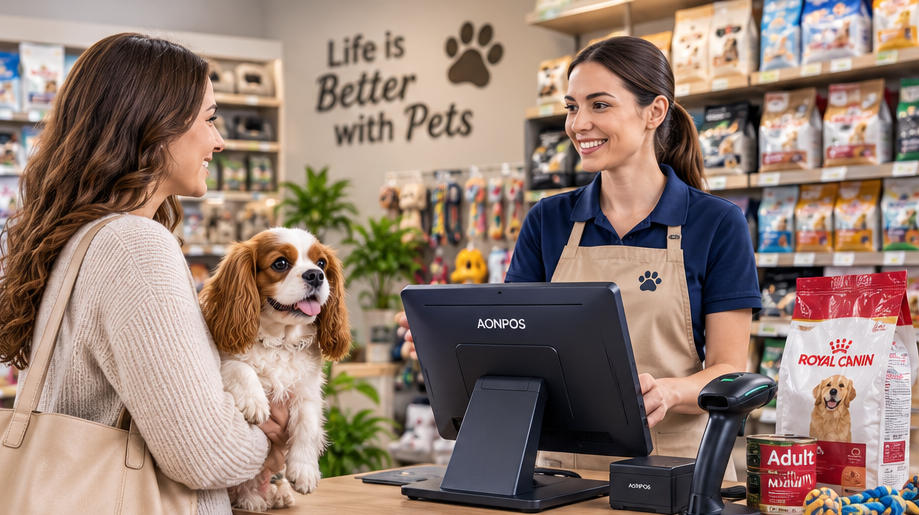
    Pet stores are no longer simple retail outlets selling bags of food and a few accessories. Modern pet retailers may carry thousands of products, including food, treats, toys, grooming supplies, health products, cages, aquariums, seasonal merchandise, and items for multiple animal categories. Some stores also provide grooming, boarding, training, veterinary, or delivery services. Managing such a diverse operation requires more than a basic cash register. A reliable POS for Pet Stores should help employees process transactions quickly, maintain accurate inventory records, manage customer relationships, and support the store’s future expansion. However, choosing the right system is not only about software. The reliability of the POS terminal, barcode scanner, receipt printer, customer display, and other peripherals can directly affect everyday operations. This guide explains what pet retailers should look for when selecting POS hardware and how the right configuration can create a faster, more organized checkout environment. Why Pet Stores Need a Specialized POS System Pet retailers face inventory and customer-service challenges that are different from those of restaurants or general service businesses. A single pet food brand may offer multiple formulas, animal types, package sizes, flavors, and life-stage options. Each variation normally has its own SKU, barcode, price, and stock quantity. The same complexity applies to collars, clothing, carriers, bedding, supplements, grooming products, and aquarium supplies. Without an efficient POS system, employees may struggle with: Locating products during checkout Tracking numerous product variations Monitoring expiration-sensitive inventory Applying promotions correctly Managing loyalty rewards Processing returns or exchanges Checking stock across multiple locations Recording grooming or service payments Reordering popular products on time An effective POS for Pet Stores connects the checkout process with the wider retail operation. Each completed sale updates inventory, records the payment, identifies the customer when applicable, and provides data that managers can use for purchasing and planning. The hardware supporting this workflow must therefore be responsive, dependable, and compatible with the retailer’s selected software platform. Essential Hardware for a Pet Store POS Setup A complete pet store checkout station generally includes a touchscreen terminal, barcode scanner, thermal printer, cash drawer, payment device, and optional customer-facing display. The exact configuration depends on the store’s size, product range, transaction volume, and service model. Retailers evaluating different configurations can begin by reviewing the AONPOS POS system range, which includes single-screen and dual-screen terminals designed for different commercial environments. 1. Touchscreen POS Terminal The POS terminal is the central component of the system. It runs the retail software and connects with the other checkout devices. Pet store employees repeatedly search for products, scan barcodes, adjust quantities, apply discounts, enroll customers in loyalty programs, and select payment methods. A responsive capacitive touchscreen can make these actions faster and easier to learn. For most fixed checkout counters, a 15-inch or 15.6-inch display provides a practical balance between visibility and counter-space efficiency. The screen should be large enough to display product information clearly without making the checkout station unnecessarily bulky. Important terminal specifications include: Responsive capacitive touch technology Commercial-grade construction Adequate processing power for the POS software SSD storage for faster performance Multiple USB ports LAN connectivity Wi-Fi or Bluetooth when required Compatible Windows or Android operating system Easy access to frequently serviced components Stable operation during long business hours An all-in-one terminal combines the computer and touchscreen in one housing, reducing cable clutter and simplifying installation. This can be especially useful in pet stores where the checkout counter may already contain product displays, impulse-purchase items, bags, and promotional materials. 2. Barcode Scanner A barcode scanner is one of the most frequently used devices in a pet store. Employees may scan hundreds of differently shaped products, from small medicine packages and treat pouches to large bags of food and oversized pet carriers. The scanner must read labels quickly, even when barcodes are curved, slightly damaged, poorly printed, or displayed on a mobile phone. A 2D barcode scanner is generally more versatile than a basic 1D model. In addition to traditional retail barcodes, it can read QR codes, digital coupons, mobile membership codes, and other two-dimensional formats. Pet retailers should consider: Fast decoding speed Support for 1D and 2D barcodes Reliable reading from printed labels and screens Handheld or hands-free operation Drop-resistant housing USB or wireless connectivity Compatibility with the POS software A comfortable design for repeated daily use A handheld scanner is useful for large or heavy merchandise because the employee can scan the item without lifting it onto the counter. Stores with high transaction volumes may combine a presentation scanner for standard items with a handheld device for bulky products. AONPOS offers a dedicated range of 1D and 2D barcode scanners for retail checkout and product-identification applications. 3. Thermal Receipt Printer Although digital receipts are increasingly common, many customers still prefer printed receipts, particularly when purchasing premium food, health products, grooming equipment, or other items that may need to be returned. Thermal printers are widely used in retail because they print quickly and do not require ink cartridges. A dependable printer helps prevent queues caused by paper jams, slow printing, or communication failures. Important considerations include: 58 mm or 80 mm paper width Printing speed Auto-cutter durability Easy paper loading USB, Ethernet, serial, or Bluetooth connectivity Driver support Compatibility with the selected operating system Availability of replacement paper Access to technical support An 80 mm printer is often suitable for full-size retail receipts containing item descriptions, taxes, discounts, loyalty information, return policies, and promotional messages. Compact stores with shorter receipts may consider a 58 mm model. Retail buyers can explore the AONPOS thermal printer category when planning a complete checkout hardware package. 4. Cash Drawer Even when card and mobile payments are popular, many pet stores still accept cash. The cash drawer should connect to the receipt printer or POS terminal and open automatically after an authorized cash transaction. Look for a drawer with: Durable metal construction Adjustable note and coin compartments Secure locking options Emergency manual access Reliable printer-driven opening Sufficient capacity for the store’s transaction volume Stores should also use staff permissions and end-of-shift reconciliation procedures to reduce cash-handling errors. 5. Customer-Facing Display A customer display allows shoppers to see scanned items, prices, discounts, taxes, loyalty points, and the final total before payment. This visibility can be particularly valuable in pet stores because customers often purchase multiple similar products in different flavors, sizes, or quantities. Seeing each item on the screen helps customers identify scanning or pricing mistakes before the transaction is completed. A secondary screen can also display: New product promotions Membership benefits Adoption events Grooming offers Seasonal campaigns Private-label products Supplier advertisements QR codes for digital receipts or social media Pet retailers deciding between terminal formats may find the comparison in Dual-Screen vs. Single-Screen POS Systems useful. A compact single-screen terminal may be sufficient for a small neighborhood store, while a dual-screen system can improve transparency and create additional marketing opportunities. Important Software Functions for Pet Retail AONPOS primarily focuses on POS hardware, so retailers should select compatible software that supports their specific operational needs. Hardware and software must be evaluated together before purchasing or deploying a system. Detailed Inventory Management Inventory is one of the most important functions of a POS for Pet Stores. The software should track products by SKU, barcode, brand, category, package size, supplier, cost, selling price, and stock level. Useful capabilities include: Real-time inventory updates Low-stock alerts Purchase-order management Product variation tracking Supplier records Stock transfers Inventory counting Expiration-date monitoring Damaged-item adjustments Multi-location visibility Expiration management is particularly important for pet food, treats, supplements, medicines, and selected grooming products. Depending on the software, stores may track expiration dates by batch or use first-in, first-out inventory procedures. Loyalty Programs and Customer Profiles Pet retail is highly suited to repeat-purchase programs. Customers regularly return for food, litter, treats, medication, grooming supplies, and other consumable products. A POS system can record purchase history and support: Points-based loyalty programs Member-only pricing Automatic discounts Birthday promotions Product recommendations Reorder reminders Digital coupons Email or SMS campaigns Subscription-style purchases Stores may also record basic pet information, such as animal type, breed, age, dietary preference, or birthday, where local privacy rules and the software configuration permit it. This information can help employees provide more relevant service without relying entirely on memory. Promotion and Pricing Management Pet stores frequently run bundled offers, supplier-funded promotions, seasonal discounts, and loyalty campaigns. The software should support pricing rules such as: Buy-one-get-one promotions Multi-buy discounts Category discounts Mix-and-match offers Member pricing Coupon codes Time-limited promotions Clearance pricing Employee discounts The checkout interface should make valid promotions easy to apply while restricting unauthorized manual discounts. Returns and Exchanges Customers may return products because of incorrect sizing, damaged packaging, pet preferences, or dietary issues. A structured return process helps employees verify the original transaction and follow store policy consistently. The POS software should ideally allow staff to: Find the original sale Return individual items Record a reason code Refund to the original payment method Issue store credit Exchange products Update inventory automatically Require manager approval for selected transactions For pet food and health-related products, stores should also establish clear rules regarding opened packages, damaged seals, and items that cannot be resold. Service Management Some pet stores generate revenue from grooming, training, boarding, washing stations, or veterinary services. These businesses may need software that combines product sales with appointments and service payments. Relevant functions can include: Appointment scheduling Employee assignment Service packages Deposits Customer notes Pet profiles Recurring appointments Service reminders Commission tracking Product and service transactions on one receipt Before selecting hardware, the retailer should confirm whether the service-management software supports the preferred operating system, display resolution, peripherals, and payment integrations. Choosing Between Single-Screen and Dual-Screen POS Hardware The right terminal format depends on the store’s operating model. A single-screen POS system is usually appropriate for: Small independent pet shops Compact counters Low to moderate transaction volumes Budget-conscious store openings Pop-up pet supply stores Mobile adoption or promotional events A dual-screen POS system may be better for: Large pet supply stores High-volume checkout counters Loyalty-focused retailers Stores running frequent promotions Multi-location chains Businesses wanting customer-facing advertising A dual-screen terminal lets customers follow the transaction while giving the cashier a separate working interface. Selected AONPOS retail models, such as the AONPOS Retail All-in-One POS System, support customer-facing display configurations for commercial checkout environments. Connectivity and Peripheral Compatibility A POS terminal should provide enough ports for both current equipment and future expansion. A typical pet store configuration may need connections for: Barcode scanner Receipt printer Cash drawer Customer display Payment terminal Label printer Weighing scale Keyboard or mouse External storage Network cable Wi-Fi adapter Customer loyalty reader Retailers should create a complete peripheral list before selecting the terminal. A low-cost machine with too few ports may require adapters or hubs, making the checkout area less reliable and harder to maintain. Compatibility should be confirmed at several levels: The operating system must support the POS software. The software must support the required scanner, printer, and payment devices. The terminal must provide the correct physical interfaces. Drivers must be available for the selected operating system. The processor and memory must meet the software provider’s requirements. A hardware sample should ideally be tested with the actual software image before a large order is approved. POS Configurations for Different Pet Store Formats Small Independent Pet Shop A practical entry-level setup may include: Single-screen all-in-one terminal Handheld 2D barcode scanner Thermal receipt printer Cash drawer Separate payment terminal The main priorities are affordability, compact installation, and dependable daily operation. Medium-Sized Pet Supply Store A more advanced configuration may include: Dual-screen POS terminal Presentation scanner Additional handheld scanner 80 mm thermal printer Cash drawer Integrated loyalty workflow Label printer Multi-user inventory software This arrangement supports faster checkout and better customer interaction. Large or Multi-Location Pet Retailer A chain or high-volume store may require: Multiple checkout terminals Centralized inventory management Customer-facing displays Commercial barcode scanners Network receipt printers Mobile inventory devices Backup hardware Standardized operating-system images Remote device-management tools Consistent replacement components Businesses planning a larger rollout can also review the Best POS System for Restaurants and Retail in 2026, which covers scalability, hardware-software compatibility, and considerations for distributors and enterprise buyers. Durability and Maintenance Considerations Pet store equipment operates in an environment where dust, fur, packaging debris, and frequent customer traffic are common. POS hardware should therefore be easy to clean and suitable for continuous commercial use. Look for: True-flat touchscreens Stable metal stands Fanless or efficient cooling designs Durable scanner housings Organized cable routing Easy printer-paper replacement Accessible storage and memory components Replaceable power adapters Consistent component availability Stores should clean screens and scanners regularly, inspect cables, test printers, and keep spare receipt paper available. High-volume locations may also maintain a backup scanner, printer, or complete terminal to minimize downtime. Why Consider AONPOS for Pet Store Projects? AONPOS is a POS hardware manufacturer offering all-in-one terminals, barcode scanners, thermal printers, kiosks, touch monitors, stands, and related checkout peripherals. Its product portfolio includes single-screen, dual-screen, desktop, Windows-based, Android-compatible, and customizable hardware options. For distributors, software companies, system integrators, and retail chains, AONPOS can support OEM and ODM requirements such as: Custom logos and branding Housing-color customization Processor and memory selection Storage configuration Screen-size options Customer-display configurations Peripheral integration Packaging customization Operating-system preparation Project-based hardware matching The company describes its business as focused on ODM/OEM manufacturing of touch POS terminals and related peripherals. Rather than choosing each device independently, buyers can work toward a standardized hardware package containing the terminal, scanner, printer, display, and required accessories. Standardization can simplify installation, employee training, troubleshooting, spare-parts planning, and multi-store deployment. Final Checklist for Selecting POS for Pet Stores Before placing an order, confirm that the proposed system: Supports the store’s inventory structure Works with the selected retail software Handles product and service transactions Reads both printed and mobile barcodes Has enough ports for all peripherals Supports the required payment devices Fits the available counter space Can operate reliably throughout business hours Is easy for employees to learn Supports future store expansion Offers appropriate technical and replacement support Can be customized when required Conclusion Choosing the right POS for Pet Stores requires more than comparing prices or selecting a visually attractive terminal. Pet retailers must consider product complexity, inventory accuracy, barcode performance, loyalty workflows, promotional pricing, returns, service management, and long-term scalability. A responsive all-in-one terminal provides the foundation, while dependable barcode scanners, thermal printers, cash drawers, and customer displays complete the checkout environment. When these devices are properly matched with suitable pet retail software, the POS system can reduce transaction friction, improve inventory visibility, and help employees deliver more informed customer service. For independent stores, chains, distributors, and software integrators, AONPOS offers flexible POS hardware that can be configured for different retail formats. By testing compatibility, selecting commercial-grade components, and planning for future expansion, buyers can build a pet store checkout solution that supports both everyday reliability and long-term business growth.
تحتاج مساعدة؟ دردش معنا

ترك رسالة
لأي طلب معلومات أو دعم فني ، املأ النموذج. جميع الحقول التي تحمل علامة النجمة * مطلوبة.
يُقدِّم

بيت

منتجات

whatsApp

اتصال