POS for Pet Stores: How to Choose the Right System for Smarter Retail Operatio
Jul 24, 2026
Pet stores are no longer simple retail outlets selling bags of food and a few accessories. Modern pet retailers may carry thousands of products, including food, treats, toys, grooming supplies, health products, cages, aquariums, seasonal merchandise, and items for multiple animal categories. Some stores also provide grooming, boarding, training, veterinary, or delivery services.
Managing such a diverse operation requires more than a basic cash register. A reliable POS for Pet Stores should help employees process transactions quickly, maintain accurate inventory records, manage customer relationships, and support the store’s future expansion.
However, choosing the right system is not only about software. The reliability of the POS terminal, barcode scanner, receipt printer, customer display, and other peripherals can directly affect everyday operations. This guide explains what pet retailers should look for when selecting POS hardware and how the right configuration can create a faster, more organized checkout environment.
Why Pet Stores Need a Specialized POS System
Pet retailers face inventory and customer-service challenges that are different from those of restaurants or general service businesses.
A single pet food brand may offer multiple formulas, animal types, package sizes, flavors, and life-stage options. Each variation normally has its own SKU, barcode, price, and stock quantity. The same complexity applies to collars, clothing, carriers, bedding, supplements, grooming products, and aquarium supplies.
Without an efficient POS system, employees may struggle with:
Locating products during checkout
Tracking numerous product variations
Monitoring expiration-sensitive inventory
Applying promotions correctly
Managing loyalty rewards
Processing returns or exchanges
Checking stock across multiple locations
Recording grooming or service payments
Reordering popular products on time
An effective POS for Pet Stores connects the checkout process with the wider retail operation. Each completed sale updates inventory, records the payment, identifies the customer when applicable, and provides data that managers can use for purchasing and planning.
The hardware supporting this workflow must therefore be responsive, dependable, and compatible with the retailer’s selected software platform.
Essential Hardware for a Pet Store POS Setup
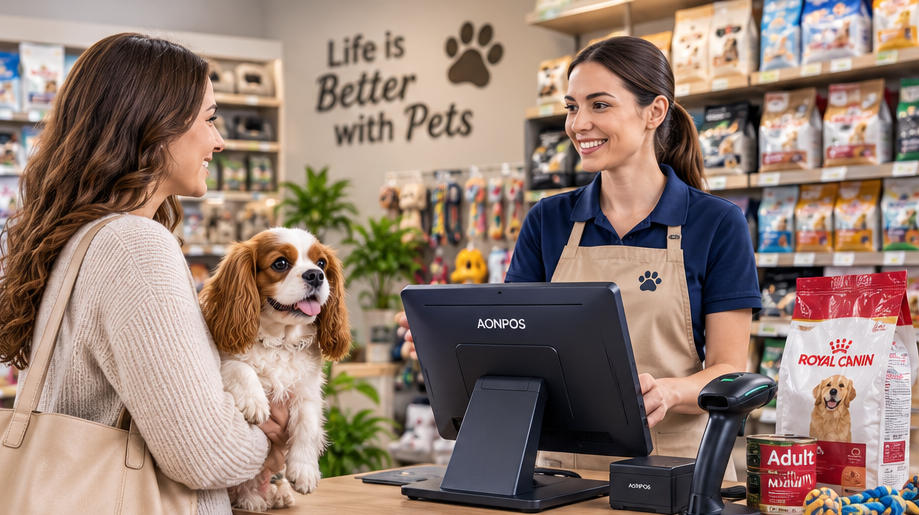
A complete pet store checkout station generally includes a touchscreen terminal, barcode scanner, thermal printer, cash drawer, payment device, and optional customer-facing display. The exact configuration depends on the store’s size, product range, transaction volume, and service model.
Retailers evaluating different configurations can begin by reviewing the AONPOS POS system range, which includes single-screen and dual-screen terminals designed for different commercial environments.
1. Touchscreen POS Terminal
The POS terminal is the central component of the system. It runs the retail software and connects with the other checkout devices.
Pet store employees repeatedly search for products, scan barcodes, adjust quantities, apply discounts, enroll customers in loyalty programs, and select payment methods. A responsive capacitive touchscreen can make these actions faster and easier to learn.
For most fixed checkout counters, a 15-inch or 15.6-inch display provides a practical balance between visibility and counter-space efficiency. The screen should be large enough to display product information clearly without making the checkout station unnecessarily bulky.
Important terminal specifications include:
Responsive capacitive touch technology
Commercial-grade construction
Adequate processing power for the POS software
SSD storage for faster performance
Multiple USB ports
LAN connectivity
Wi-Fi or Bluetooth when required
Compatible Windows or Android operating system
Easy access to frequently serviced components
Stable operation during long business hours
An all-in-one terminal combines the computer and touchscreen in one housing, reducing cable clutter and simplifying installation. This can be especially useful in pet stores where the checkout counter may already contain product displays, impulse-purchase items, bags, and promotional materials.
2. Barcode Scanner
A barcode scanner is one of the most frequently used devices in a pet store. Employees may scan hundreds of differently shaped products, from small medicine packages and treat pouches to large bags of food and oversized pet carriers.
The scanner must read labels quickly, even when barcodes are curved, slightly damaged, poorly printed, or displayed on a mobile phone.
A 2D barcode scanner is generally more versatile than a basic 1D model. In addition to traditional retail barcodes, it can read QR codes, digital coupons, mobile membership codes, and other two-dimensional formats.
Pet retailers should consider:
Fast decoding speed
Support for 1D and 2D barcodes
Reliable reading from printed labels and screens
Handheld or hands-free operation
Drop-resistant housing
USB or wireless connectivity
Compatibility with the POS software
A comfortable design for repeated daily use
A handheld scanner is useful for large or heavy merchandise because the employee can scan the item without lifting it onto the counter. Stores with high transaction volumes may combine a presentation scanner for standard items with a handheld device for bulky products.
AONPOS offers a dedicated range of 1D and 2D barcode scanners for retail checkout and product-identification applications.
3. Thermal Receipt Printer
Although digital receipts are increasingly common, many customers still prefer printed receipts, particularly when purchasing premium food, health products, grooming equipment, or other items that may need to be returned.
Thermal printers are widely used in retail because they print quickly and do not require ink cartridges. A dependable printer helps prevent queues caused by paper jams, slow printing, or communication failures.
Important considerations include:
58 mm or 80 mm paper width
Printing speed
Auto-cutter durability
Easy paper loading
USB, Ethernet, serial, or Bluetooth connectivity
Driver support
Compatibility with the selected operating system
Availability of replacement paper
Access to technical support
An 80 mm printer is often suitable for full-size retail receipts containing item descriptions, taxes, discounts, loyalty information, return policies, and promotional messages. Compact stores with shorter receipts may consider a 58 mm model.
Retail buyers can explore the AONPOS thermal printer category when planning a complete checkout hardware package.
4. Cash Drawer
Even when card and mobile payments are popular, many pet stores still accept cash. The cash drawer should connect to the receipt printer or POS terminal and open automatically after an authorized cash transaction.
Look for a drawer with:
Durable metal construction
Adjustable note and coin compartments
Secure locking options
Emergency manual access
Reliable printer-driven opening
Sufficient capacity for the store’s transaction volume
Stores should also use staff permissions and end-of-shift reconciliation procedures to reduce cash-handling errors.
5. Customer-Facing Display
A customer display allows shoppers to see scanned items, prices, discounts, taxes, loyalty points, and the final total before payment.
This visibility can be particularly valuable in pet stores because customers often purchase multiple similar products in different flavors, sizes, or quantities. Seeing each item on the screen helps customers identify scanning or pricing mistakes before the transaction is completed.
A secondary screen can also display:
New product promotions
Membership benefits
Adoption events
Grooming offers
Seasonal campaigns
Private-label products
Supplier advertisements
QR codes for digital receipts or social media
Pet retailers deciding between terminal formats may find the comparison in Dual-Screen vs. Single-Screen POS Systems useful. A compact single-screen terminal may be sufficient for a small neighborhood store, while a dual-screen system can improve transparency and create additional marketing opportunities.
Important Software Functions for Pet Retail
AONPOS primarily focuses on POS hardware, so retailers should select compatible software that supports their specific operational needs. Hardware and software must be evaluated together before purchasing or deploying a system.
Detailed Inventory Management
Inventory is one of the most important functions of a POS for Pet Stores. The software should track products by SKU, barcode, brand, category, package size, supplier, cost, selling price, and stock level.
Useful capabilities include:
Real-time inventory updates
Low-stock alerts
Purchase-order management
Product variation tracking
Supplier records
Stock transfers
Inventory counting
Expiration-date monitoring
Damaged-item adjustments
Multi-location visibility
Expiration management is particularly important for pet food, treats, supplements, medicines, and selected grooming products. Depending on the software, stores may track expiration dates by batch or use first-in, first-out inventory procedures.
Loyalty Programs and Customer Profiles
Pet retail is highly suited to repeat-purchase programs. Customers regularly return for food, litter, treats, medication, grooming supplies, and other consumable products.
A POS system can record purchase history and support:
Points-based loyalty programs
Member-only pricing
Automatic discounts
Birthday promotions
Product recommendations
Reorder reminders
Digital coupons
Email or SMS campaigns
Subscription-style purchases
Stores may also record basic pet information, such as animal type, breed, age, dietary preference, or birthday, where local privacy rules and the software configuration permit it. This information can help employees provide more relevant service without relying entirely on memory.
Promotion and Pricing Management
Pet stores frequently run bundled offers, supplier-funded promotions, seasonal discounts, and loyalty campaigns.
The software should support pricing rules such as:
Buy-one-get-one promotions
Multi-buy discounts
Category discounts
Mix-and-match offers
Member pricing
Coupon codes
Time-limited promotions
Clearance pricing
Employee discounts
The checkout interface should make valid promotions easy to apply while restricting unauthorized manual discounts.
Returns and Exchanges
Customers may return products because of incorrect sizing, damaged packaging, pet preferences, or dietary issues. A structured return process helps employees verify the original transaction and follow store policy consistently.
The POS software should ideally allow staff to:
Find the original sale
Return individual items
Record a reason code
Refund to the original payment method
Issue store credit
Exchange products
Update inventory automatically
Require manager approval for selected transactions
For pet food and health-related products, stores should also establish clear rules regarding opened packages, damaged seals, and items that cannot be resold.
Service Management
Some pet stores generate revenue from grooming, training, boarding, washing stations, or veterinary services. These businesses may need software that combines product sales with appointments and service payments.
Relevant functions can include:
Appointment scheduling
Employee assignment
Service packages
Deposits
Customer notes
Pet profiles
Recurring appointments
Service reminders
Commission tracking
Product and service transactions on one receipt
Before selecting hardware, the retailer should confirm whether the service-management software supports the preferred operating system, display resolution, peripherals, and payment integrations.
Choosing Between Single-Screen and Dual-Screen POS Hardware
The right terminal format depends on the store’s operating model.
A single-screen POS system is usually appropriate for:
Small independent pet shops
Compact counters
Low to moderate transaction volumes
Budget-conscious store openings
Pop-up pet supply stores
Mobile adoption or promotional events
A dual-screen POS system may be better for:
Large pet supply stores
High-volume checkout counters
Loyalty-focused retailers
Stores running frequent promotions
Multi-location chains
Businesses wanting customer-facing advertising
A dual-screen terminal lets customers follow the transaction while giving the cashier a separate working interface. Selected AONPOS retail models, such as the AONPOS Retail All-in-One POS System, support customer-facing display configurations for commercial checkout environments.
Connectivity and Peripheral Compatibility
A POS terminal should provide enough ports for both current equipment and future expansion.
A typical pet store configuration may need connections for:
Barcode scanner
Receipt printer
Cash drawer
Customer display
Payment terminal
Label printer
Weighing scale
Keyboard or mouse
External storage
Network cable
Wi-Fi adapter
Customer loyalty reader
Retailers should create a complete peripheral list before selecting the terminal. A low-cost machine with too few ports may require adapters or hubs, making the checkout area less reliable and harder to maintain.
Compatibility should be confirmed at several levels:
The operating system must support the POS software.
The software must support the required scanner, printer, and payment devices.
The terminal must provide the correct physical interfaces.
Drivers must be available for the selected operating system.
The processor and memory must meet the software provider’s requirements.
A hardware sample should ideally be tested with the actual software image before a large order is approved.
POS Configurations for Different Pet Store Formats
Small Independent Pet Shop
A practical entry-level setup may include:
Single-screen all-in-one terminal
Handheld 2D barcode scanner
Thermal receipt printer
Cash drawer
Separate payment terminal
The main priorities are affordability, compact installation, and dependable daily operation.
Medium-Sized Pet Supply Store
A more advanced configuration may include:
Dual-screen POS terminal
Presentation scanner
Additional handheld scanner
80 mm thermal printer
Cash drawer
Integrated loyalty workflow
Label printer
Multi-user inventory software
This arrangement supports faster checkout and better customer interaction.
Large or Multi-Location Pet Retailer
A chain or high-volume store may require:
Multiple checkout terminals
Centralized inventory management
Customer-facing displays
Commercial barcode scanners
Network receipt printers
Mobile inventory devices
Backup hardware
Standardized operating-system images
Remote device-management tools
Consistent replacement components
Businesses planning a larger rollout can also review the Best POS System for Restaurants and Retail in 2026, which covers scalability, hardware-software compatibility, and considerations for distributors and enterprise buyers.
Durability and Maintenance Considerations
Pet store equipment operates in an environment where dust, fur, packaging debris, and frequent customer traffic are common. POS hardware should therefore be easy to clean and suitable for continuous commercial use.
Look for:
True-flat touchscreens
Stable metal stands
Fanless or efficient cooling designs
Durable scanner housings
Organized cable routing
Easy printer-paper replacement
Accessible storage and memory components
Replaceable power adapters
Consistent component availability
Stores should clean screens and scanners regularly, inspect cables, test printers, and keep spare receipt paper available. High-volume locations may also maintain a backup scanner, printer, or complete terminal to minimize downtime.
Why Consider AONPOS for Pet Store Projects?
AONPOS is a POS hardware manufacturer offering all-in-one terminals, barcode scanners, thermal printers, kiosks, touch monitors, stands, and related checkout peripherals. Its product portfolio includes single-screen, dual-screen, desktop, Windows-based, Android-compatible, and customizable hardware options.
For distributors, software companies, system integrators, and retail chains, AONPOS can support OEM and ODM requirements such as:
Custom logos and branding
Housing-color customization
Processor and memory selection
Storage configuration
Screen-size options
Customer-display configurations
Peripheral integration
Packaging customization
Operating-system preparation
Project-based hardware matching
The company describes its business as focused on ODM/OEM manufacturing of touch POS terminals and related peripherals.
Rather than choosing each device independently, buyers can work toward a standardized hardware package containing the terminal, scanner, printer, display, and required accessories. Standardization can simplify installation, employee training, troubleshooting, spare-parts planning, and multi-store deployment.
Final Checklist for Selecting POS for Pet Stores
Before placing an order, confirm that the proposed system:
Supports the store’s inventory structure
Works with the selected retail software
Handles product and service transactions
Reads both printed and mobile barcodes
Has enough ports for all peripherals
Supports the required payment devices
Fits the available counter space
Can operate reliably throughout business hours
Is easy for employees to learn
Supports future store expansion
Offers appropriate technical and replacement support
Can be customized when required
Conclusion
Choosing the right POS for Pet Stores requires more than comparing prices or selecting a visually attractive terminal. Pet retailers must consider product complexity, inventory accuracy, barcode performance, loyalty workflows, promotional pricing, returns, service management, and long-term scalability.
A responsive all-in-one terminal provides the foundation, while dependable barcode scanners, thermal printers, cash drawers, and customer displays complete the checkout environment. When these devices are properly matched with suitable pet retail software, the POS system can reduce transaction friction, improve inventory visibility, and help employees deliver more informed customer service.
For independent stores, chains, distributors, and software integrators, AONPOS offers flexible POS hardware that can be configured for different retail formats. By testing compatibility, selecting commercial-grade components, and planning for future expansion, buyers can build a pet store checkout solution that supports both everyday reliability and long-term business growth.