Aonpos الكل في مكان واحد
  • What Hardware is Included in a POS System?
    What Hardware is Included in a POS System? May 04, 2026
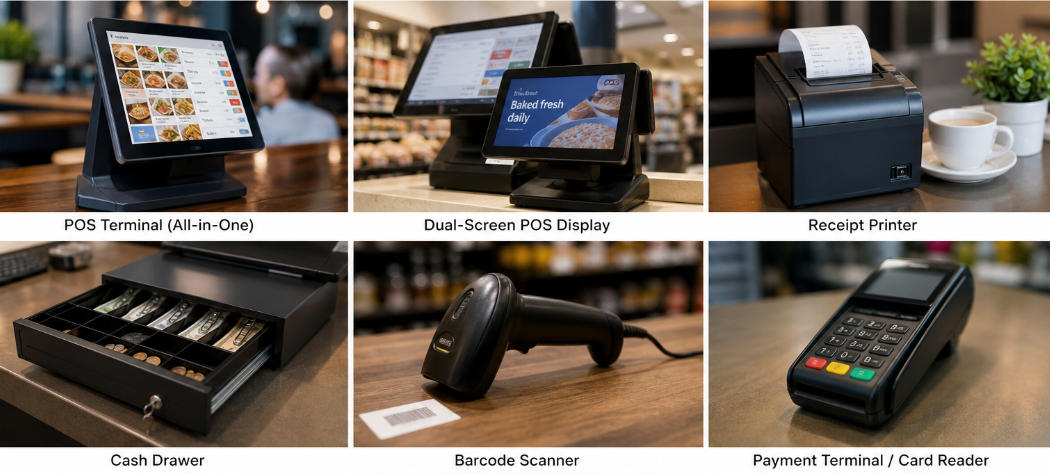
    A modern point-of-sale solution is no longer just a cash register. Today, businesses rely on a complete ecosystem of POS hardware to manage transactions, inventory, customer data, and payment security. Whether you run a restaurant, retail store, supermarket, or hospitality business, understanding the right POS terminal components is essential before investing in a new system. This guide explains the core POS devices included in a POS system, how each component works, and how businesses can choose the right hardware setup for long-term operational efficiency. Why POS Hardware Matters Software often gets most of the attention in POS discussions, but the physical hardware directly impacts speed, durability, and customer experience. High-quality POS hardware helps businesses: Reduce checkout time Improve order accuracy Support multiple payment methods Simplify staff training Lower maintenance costs Improve counter organization For industries with high transaction volume, reliable POS devices can directly affect revenue and customer satisfaction. 1. POS Terminal: The Core of Every POS System The POS terminal is the primary device used to run sales operations. It functions as the central control unit where staff process orders, manage products, check inventory, and complete transactions. Common POS terminal formats include: All-in-One POS Terminal An all-in-one unit integrates display, processor, and operating system into one compact device. Benefits: Space saving Cleaner counter layout Easier installation Lower cable complexity Many modern businesses prefer all-in-one systems because they combine multiple POS terminal components into one streamlined solution. Modular POS System A modular setup separates monitor, computer, and peripherals. Benefits: Flexible upgrades Custom hardware selection Easier replacement of individual parts Businesses with unique workflows often choose modular POS hardware for scalability. 2. Touchscreen Display A touchscreen is one of the most important POS devices in modern retail and restaurant environments. Benefits include: Faster order entry Shorter employee onboarding Fewer manual input errors More intuitive navigation Many businesses now use capacitive touchscreens for better durability and smoother user interaction. Dual-Screen POS Displays A dual-screen configuration includes: Operator display Customer-facing display Customer displays improve transparency by showing: Order details Payment totals Promotions Loyalty programs Brands like Aonpos offer dual-screen and all-in-one POS solutions designed for retail and restaurant operations, where customer interaction is part of the buying experience. 3. Receipt Printer Receipt printers remain standard POS terminal components for both restaurants and retail stores. Main printer types: Thermal Receipt Printer Most common option. Advantages: Fast printing Quiet operation Lower maintenance No ink required Impact Printer Still used in some kitchen environments. Advantages: Multi-copy printing Durable in heat-heavy conditions Receipt printers are essential POS hardware for: Transaction confirmation Returns and exchanges Kitchen ticket printing Audit trails 4. Cash Drawer Although digital payments continue to grow, many businesses still accept cash. A cash drawer is a secure storage unit connected to the POS system. Functions: Organizes bills and coins Opens automatically after cash transactions Supports shift balancing and reconciliation For hybrid payment businesses, cash drawers remain a necessary part of POS devices. 5. Barcode Scanner A barcode scanner is critical for businesses managing large inventories. Use cases: Product lookup Inventory management Checkout acceleration Pricing accuracy Scanner types: Handheld Scanner Best for: Retail stores Warehouses Inventory audits Fixed Scanner Best for: Grocery stores High-volume checkout lanes Barcode scanners are among the highest ROI POS hardware investments because they significantly reduce manual errors. 6. Card Reader and Payment Terminal A payment terminal allows businesses to accept: EMV chip cards Magnetic stripe cards NFC/contactless payments Mobile wallets Modern payment readers are essential POS terminal components for payment flexibility and security compliance. Important features: PCI compliance Encryption Contactless support Fast transaction approval Restaurants and retail businesses should prioritize payment hardware that supports future payment trends. 7. Customer Display Customer-facing displays are increasingly common POS devices. Benefits: Order verification Reduced disputes Upsell promotions Branding opportunities This hardware is especially valuable in restaurants and quick-service environments. 8. Additional POS Devices Depending on industry needs, businesses may also require extra POS hardware: Kitchen Display System (KDS) Used in restaurants to replace paper tickets. Label Printer Used for: Pricing labels Shipping labels Shelf tags Cash Counting Machine Useful for high-cash environments. Weighing Scale Common in grocery and food retail. Handheld POS Device Mobile checkout for: Table service Pop-up stores Inventory scanning These specialized POS devices help businesses customize workflows. How to Choose the Right POS Hardware When selecting POS hardware, businesses should evaluate: Business Type A restaurant needs different POS terminal components than a retail store. Counter Space Compact counters benefit from all-in-one terminals. Transaction Volume High-volume businesses need durable hardware. Expansion Plans Scalable systems reduce future replacement costs. Integration Compatibility Hardware should work seamlessly with POS software and payment providers. For businesses comparing solutions, reviewing a complete buyer guide can help narrow down the best hardware-software combination. Recommended Reading:Learn how to choose the best POS system for your business in this complete B2B guide:https://www.aonpostech.com/best-pos-system-for-restaurants-retail-in-2026-complete-b2b-buyer-guide Conclusion A complete POS system typically includes several essential POS hardware components: POS terminal Touchscreen display Receipt printer Cash drawer Barcode scanner Payment terminal Customer display Additional POS devices may include kitchen displays, label printers, handheld terminals, and scales depending on industry requirements. Understanding these POS terminal components helps businesses invest in systems that improve efficiency, enhance customer experience, and support long-term growth. As businesses increasingly move toward integrated solutions, manufacturers such as Aonpos continue developing all-in-one and dual-screen POS hardware designed for restaurants, retail stores, and supermarkets.
  • Best Restaurant POS Hardware in 2026: A Complete Buyer's Guide
    Best Restaurant POS Hardware in 2026: A Complete Buyer's Guide Jul 09, 2026
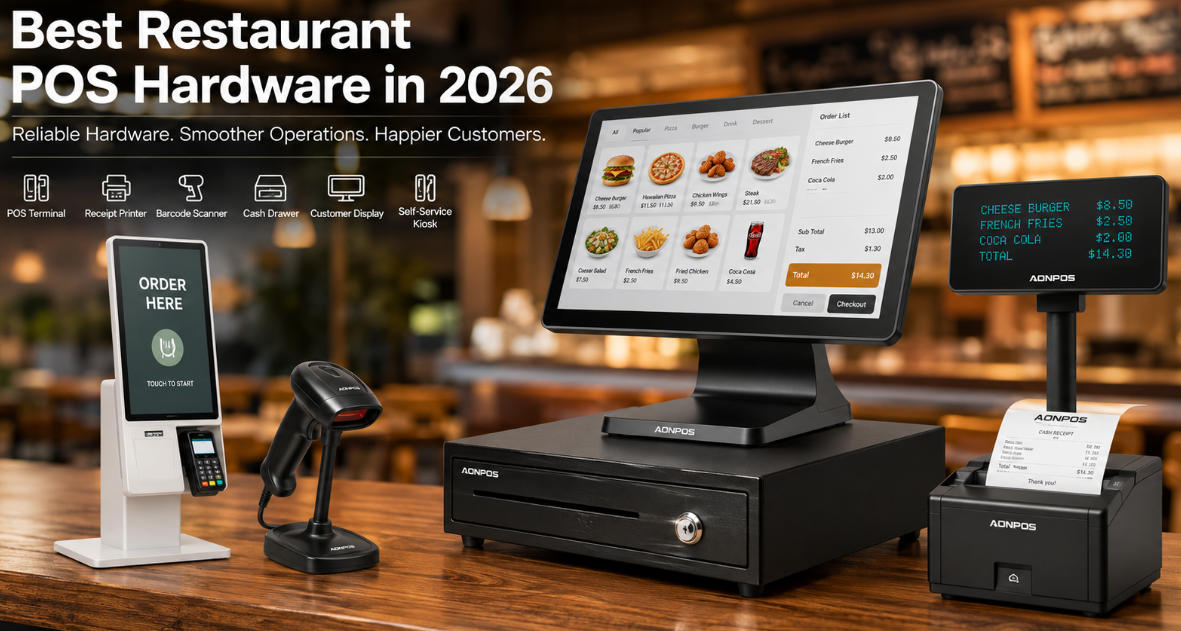
    The restaurant industry continues to evolve rapidly in 2026. Digital ordering, contactless payments, QR code menus, kitchen automation, and self-service ordering have become standard expectations rather than premium features. While POS software often gets the spotlight, restaurant POS hardware is the foundation that keeps every transaction running smoothly. Reliable hardware minimizes downtime, speeds up service, and improves customer satisfaction—making it one of the most important investments for restaurants of all sizes. Whether you're opening a new café, upgrading a quick-service restaurant, or expanding a restaurant chain, choosing the right POS hardware can significantly improve operational efficiency. Why Restaurant POS Hardware Matters Modern restaurants process hundreds or even thousands of transactions every day. Hardware failures can lead to: Longer waiting times Lost orders Payment delays Customer complaints Increased maintenance costs Professional restaurant POS hardware is designed for continuous operation in demanding environments where heat, grease, spills, and heavy daily usage are common. Essential Restaurant POS Hardware in 2026 1. POS Terminal The POS terminal is the heart of every restaurant checkout system. Modern terminals combine: High-performance processors Capacitive touchscreen displays Multiple connectivity options Fast payment processing Durable industrial-grade construction For restaurants with limited counter space, all-in-one POS terminals provide a clean and efficient setup. 2. Touch Screen Monitor Restaurants rely heavily on touch interaction. An ideal restaurant touchscreen should offer: Responsive multi-touch operation Water-resistant front panel Anti-grease surface High brightness for kitchen environments Long service life Servers, cashiers, and kitchen staff all benefit from fast and accurate touch response. 3. Thermal Receipt Printer Even with digital receipts becoming more common, thermal receipt printers remain essential. A quality restaurant printer should provide: High-speed printing Auto cutter Stable USB/LAN/Bluetooth connectivity Low maintenance Quiet operation Kitchen printers also play an important role by ensuring orders are delivered quickly to the preparation area. 4. Barcode Scanner Although restaurants don't always scan customer items like supermarkets, barcode scanners are increasingly used for: Inventory management Ingredient tracking Beverage sales Retail products Membership cards 2D barcode scanners also support QR code payments, loyalty programs, and digital coupons. 5. Cash Drawer Cash payments remain common in many regions. A durable cash drawer should feature: Steel construction Multiple bill compartments Adjustable coin trays Electronic opening Long lifecycle Reliable cash drawers help maintain secure cash management during busy hours. 6. Customer Display Customer-facing displays increase transparency during checkout. Benefits include: Showing ordered items Displaying total amounts Supporting digital signatures Advertising promotions Improving customer confidence Many restaurants now use dual-screen POS systems to enhance customer engagement. 7. Self-Service Ordering Kiosk Self-service kiosks continue to grow in popularity across: Fast food restaurants Bubble tea shops Coffee chains Bakeries Food courts Benefits include: Reduced labor costs Faster ordering Higher average order value Shorter queues Improved customer experience Many restaurant chains now combine kiosks with mobile ordering for a seamless omnichannel experience. Features to Look for in Restaurant POS Hardware Durable Industrial Design Restaurant equipment operates in demanding environments. Look for hardware with: Aluminum alloy or reinforced plastic housing Fanless cooling Spill-resistant design Wide operating temperature support Fast Processing Performance Slow POS systems create long checkout lines. Choose hardware powered by modern Intel or ARM processors capable of handling: POS software Kitchen Display Systems (KDS) Inventory management Online orders Payment processing simultaneously Flexible Connectivity Restaurants often connect multiple peripherals. Your POS hardware should support: USB Ethernet Wi-Fi Bluetooth Serial ports Cash drawer interface Easy Maintenance Commercial POS hardware should minimize downtime. Consider devices that offer: Tool-free maintenance SSD storage Fanless architecture Remote management support Long product lifecycle Restaurant Types and Recommended POS Hardware Restaurant Type Recommended Hardware Café Compact POS Terminal + Receipt Printer Fast Food POS Terminal + Kitchen Printer + Self-Service Kiosk Fine Dining Dual Screen POS + Customer Display Food Truck Compact All-in-One POS Bakery POS + Barcode Scanner + Cash Drawer Restaurant Chain Enterprise POS + Kiosk + Central Management Future Trends in Restaurant POS Hardware The next generation of restaurant technology is focused on automation and customer convenience. Emerging trends include: AI-assisted ordering Cloud-based POS systems Self-checkout kiosks Contactless payment terminals QR code ordering Kitchen Display Systems (KDS) Mobile POS devices Digital loyalty integration Restaurants investing in scalable POS hardware today will be better prepared for tomorrow's operational demands. Why Choose AONPOS Restaurant POS Hardware? As a professional POS hardware manufacturer, AONPOS provides reliable OEM and ODM solutions for global partners. AONPOS offers a complete range of commercial POS devices, including: All-in-One POS Terminals Touch Screen Monitors Self-Service Kiosks Thermal Receipt Printers Barcode Scanners Cash Drawers Customer Displays With years of manufacturing experience, flexible customization capabilities, and strict quality control, AONPOS supports distributors, system integrators, wholesalers, and POS solution providers worldwide. Final Thoughts Selecting the best restaurant POS hardware is about more than choosing a cash register. The right hardware improves efficiency, enhances customer experience, supports business growth, and reduces long-term operating costs. Whether you're running a single café or managing an international restaurant chain, investing in durable, scalable, and high-performance POS hardware ensures your business is ready for the future. For businesses seeking dependable OEM and ODM manufacturing services, AONPOS delivers commercial-grade restaurant POS hardware designed to meet the evolving needs of the global

تحتاج مساعدة؟ دردش معنا

ترك رسالة
لأي طلب معلومات أو دعم فني ، املأ النموذج. جميع الحقول التي تحمل علامة النجمة * مطلوبة.
يُقدِّم

بيت

منتجات

whatsApp

اتصال