Aonpos الكل في مكان واحد
  • What is the Best POS for Supermarkets? A Comprehensive Guide
    What is the Best POS for Supermarkets? A Comprehensive Guide May 20, 2026
    Running a supermarket today is far more complex than just stocking shelves and ringing up customers. With increasing customer expectations, competition, and technological advancements, supermarkets must leverage tools that streamline operations, improve accuracy, and enhance the overall shopping experience. One of the most crucial tools in this ecosystem is the supermarket POS system. A POS, or Point of Sale system, is more than just a cash register—it’s the central hub of supermarket operations, connecting sales, inventory, and data analytics in one platform. Choosing the right POS can solve operational headaches, reduce costs, and even boost customer satisfaction. But with so many options available, how can supermarket owners make the right choice? This article provides a detailed guide on what to look for in a POS system, how it improves supermarket operations, and why solutions like Aonpos are gaining attention in the retail world. Why Supermarkets Need a Modern POS System The days of simple cash registers are long gone. While traditional cash registers could only calculate prices and store cash, modern POS systems are highly advanced. They combine hardware and software to manage sales, inventory, reporting, and even customer loyalty programs. Supermarkets, in particular, face unique challenges: High transaction volumes: Supermarkets can process hundreds of transactions per day, and delays at checkout directly affect customer satisfaction. Inventory complexity: Managing thousands of SKUs, perishable items, and promotions requires precise tracking. Data-driven decisions: Understanding customer behavior, popular products, and seasonal trends is critical for planning and procurement. A modern supermarket POS system addresses all these challenges in one integrated solution. Key Features to Look for in a Supermarket POS System Choosing a POS system is not just about buying software; it’s about solving operational problems. Here’s a breakdown of the essential features every supermarket should prioritize: 1. Fast and Efficient Checkout The most visible function of a POS is processing transactions. Long checkout lines frustrate customers and can lead to lost sales. An effective cash register system integrated with the POS ensures: Quick scanning of products: Barcode or QR code scanning speeds up the checkout process. Automatic price calculation: Reduces errors in pricing, discounts, and promotions. Support for multiple payment methods: Cash, credit/debit cards, mobile payments, and digital wallets. By reducing checkout times, supermarkets can improve the overall shopping experience while handling peak-hour traffic efficiently. 2. Comprehensive Inventory Management One of the biggest challenges for supermarkets is managing a large and diverse inventory. Items expire, seasonal demand fluctuates, and some products move faster than others. A POS system with robust inventory management capabilities allows supermarket managers to: Track stock in real-time, across multiple locations if needed. Receive low-stock alerts to avoid stockouts. Monitor product expiry dates to reduce waste. Analyze sales trends to plan restocking more effectively. Without this level of control, supermarkets risk either losing sales due to empty shelves or overspending on unsold stock. 3. Detailed Reporting and Analytics Data is the backbone of modern retail decision-making. A good supermarket POS system goes beyond recording sales—it provides actionable insights. Reports can help managers: Identify top-selling products and slow movers. Track sales by category, time, or location. Analyze customer behavior and purchase patterns. Optimize staff scheduling based on peak hours. These insights make decision-making faster and more informed, turning operational data into a competitive advantage. 4. Customer Management and Loyalty Programs Supermarkets thrive on repeat customers. Integrating customer management features into a POS system allows businesses to: Track customer purchases and preferences. Offer targeted promotions or discounts. Implement loyalty programs that reward regular shoppers. A POS system that supports these features can turn everyday shoppers into loyal advocates, which is essential in a competitive retail landscape. 5. Integration with Other Systems Supermarkets often use multiple software systems for accounting, supply chain management, and e-commerce. A modern POS system should integrate seamlessly with: Accounting software for accurate financial tracking. Inventory and supply chain platforms for automated reordering. Online ordering systems for omnichannel retail experiences. Integration reduces manual errors, saves time, and ensures all systems operate in sync. 6. Security and Reliability Handling cash and customer data comes with serious responsibilities. A reliable POS system must provide: Secure payment processing. User access control to prevent unauthorized transactions. Offline functionality to ensure continuity during network interruptions. Security is not optional; it’s critical to protect both your business and your customers. Common Problems Supermarkets Face Without the Right POS Understanding what can go wrong highlights why investing in the right POS is essential. Supermarkets without advanced POS systems often face: Slow checkouts and long lines – leading to dissatisfied customers. Stockouts or overstocking – due to poor inventory tracking. Data blindness – missing out on insights for promotions, staffing, or procurement. Payment errors and discrepancies – which can affect revenue and trust. Operational inefficiency – wasting staff time on manual reporting or reconciliation. By addressing these challenges, a POS system becomes more than a tool—it becomes a solution that improves every aspect of supermarket operations. Why Aonpos is a Smart Choice for Supermarkets Among the many providers in the market, Aonpos stands out for its balance of technology, reliability, and usability. Their supermarket POS systems are designed to meet the specific needs of retail environments with: Fast, reliable cash register systems for high-volume checkouts. Integrated inventory management with real-time tracking. Advanced reporting features to support data-driven decisions. Flexible payment processing and customer management capabilities. Scalable solutions suitable for both small local supermarkets and large chains. Aonpos focuses on solving real operational problems, rather than just selling features, making it an effective choice for supermarkets aiming to enhance efficiency and customer satisfaction. Steps to Choose the Best POS for Your Supermarket Selecting the right POS system is a critical business decision. Here’s a practical guide: Assess Your NeedsDetermine the size of your store, transaction volume, and inventory complexity. Compare FeaturesLook for systems that offer fast checkout, inventory management, analytics, and integration capabilities. Check Reliability and SecurityEnsure the POS system has strong data security, offline functionality, and reliable support. Consider ScalabilityChoose a system that can grow with your business and handle multiple locations if needed. Request a DemoHands-on testing helps you understand usability, speed, and workflow integration. Evaluate Total Cost of OwnershipConsider upfront costs, subscription fees, hardware, and maintenance expenses. Following these steps reduces the risk of choosing a system that doesn’t meet operational needs or fails to deliver ROI. Conclusion Choosing the best POS for a supermarket is about solving problems, not just buying technology. From speeding up checkouts to managing complex inventories and providing actionable insights, a modern supermarket POS system is essential for running an efficient, customer-focused business. Solutions like Aonpos demonstrate that a POS system can be both powerful and user-friendly, supporting supermarket managers in streamlining operations, reducing errors, and making smarter business decisions. Investing in the right POS system is an investment in the future growth and success of your supermarket.

  • Best POS Hardware for Grocery Stores: A Complete Buying Guide
    Best POS Hardware for Grocery Stores: A Complete Buying Guide Jul 06, 2026
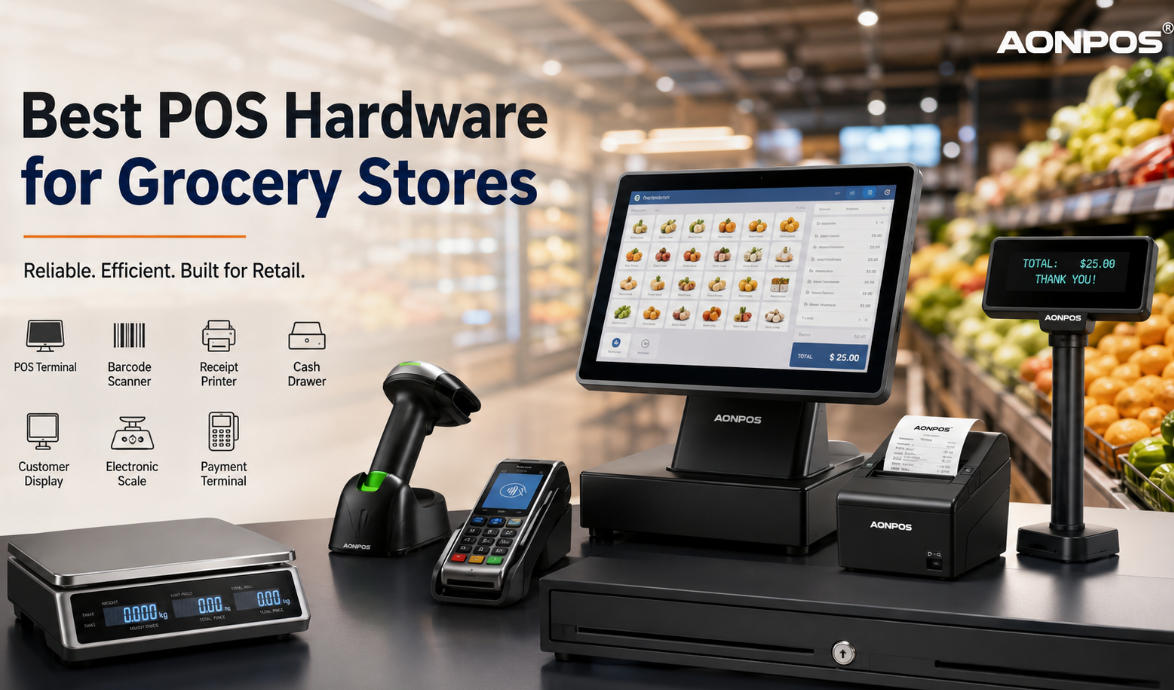
    Running a grocery store requires much more than simply processing payments. From barcode scanning and inventory tracking to weighing fresh produce and managing long checkout lines, every piece of grocery store POS hardware plays a critical role in daily operations. Whether you operate a neighborhood grocery store, supermarket, convenience store, or fresh food market, choosing the right POS hardware can significantly improve checkout speed, inventory accuracy, and customer satisfaction. In this guide, we'll explain everything you need to know about selecting grocery POS hardware and why AONPOS has become a trusted partner for retailers worldwide. Why Grocery Stores Need Specialized POS Hardware Unlike restaurants or clothing stores, grocery retailers process hundreds or even thousands of products every day. A complete grocery POS system must handle: High-volume barcode scanning Fresh produce sold by weight Fast payment processing Inventory synchronization Loyalty programs Receipt printing Cash management Long operating hours Because of these demanding environments, grocery businesses require commercial-grade POS hardware that is reliable, durable, and easy to maintain. Essential Grocery Store POS Hardware 1. POS Terminal The POS terminal serves as the central hub of your checkout system. Modern grocery POS terminals combine: High-performance processors Touchscreen displays Windows or Android operating systems Multiple USB and serial ports LAN and Wi-Fi connectivity A powerful terminal allows cashiers to process transactions quickly while running inventory, pricing, and customer management software simultaneously. What to Look For 15.6-inch or larger touchscreen Fanless industrial design SSD storage Intel or ARM processor Multiple peripheral connections AONPOS offers industrial-grade POS terminals designed specifically for high-volume retail environments. 2. Barcode Scanner Barcode scanners are among the most frequently used pieces of grocery store POS hardware. A high-quality scanner should read: 1D barcodes 2D QR codes Damaged labels Mobile payment codes Loyalty cards Recommended Features Omnidirectional scanning Fast decoding Hands-free operation USB plug-and-play Long service life For busy grocery stores, presentation scanners can significantly reduce cashier fatigue while increasing checkout speed. 3. Receipt Printer Customers still expect printed receipts, especially for grocery purchases. Thermal receipt printers provide: High-speed printing Quiet operation Low maintenance No ink replacement Typical specifications include: 80mm paper width Auto cutter USB + Ethernet connectivity 250mm/s print speed Reliable receipt printing minimizes checkout interruptions during peak shopping hours. 4. Cash Drawer Although digital payments continue to grow, many grocery stores still process cash transactions. A commercial cash drawer should offer: Heavy-duty steel construction Multiple bill compartments Coin organizers Electronic opening Manual emergency release Durability is particularly important for grocery stores that remain open every day. 5. Customer Display A customer-facing display improves transparency during checkout. It allows shoppers to view: Product prices Discounts Loyalty points Total amount Promotional advertisements Many modern grocery stores also use customer displays for cross-selling promotions. 6. Electronic Scale Integration Fresh fruits, vegetables, meat, seafood, and deli products are often sold by weight. A grocery POS system should integrate seamlessly with electronic weighing scales. Benefits include: Automatic weight transfer Reduced manual input Accurate pricing Faster checkout Lower risk of cashier errors Scale compatibility is one of the most important considerations when selecting grocery POS hardware. 7. Payment Terminal Modern customers expect multiple payment options. Your POS hardware should support: Credit cards Debit cards NFC payments Mobile wallets QR code payments Contactless transactions Fast payment processing shortens queues and enhances the shopping experience. Features to Consider When Buying Grocery Store POS Hardware Not all POS hardware is designed for grocery environments. Before making a purchase, consider the following factors. Durability Grocery stores operate long hours with continuous customer traffic. Commercial-grade hardware should withstand: Continuous operation Dust Heat Frequent cleaning Heavy daily use Expandability Your business may grow over time. Choose hardware that supports additional: Barcode scanners Customer displays Cash drawers Receipt printers Payment terminals Weighing scales Expandable systems help protect your investment. Compatibility Always verify compatibility with your POS software. Good grocery POS hardware should work with: Windows POS software Android POS systems ERP software Inventory management platforms Retail management systems Easy Maintenance Downtime costs money. Choose hardware that offers: Fanless cooling Modular design Easy component replacement Long product lifecycle Reliable technical support Why Choose AONPOS Grocery Store POS Hardware? With years of experience in POS manufacturing, AONPOS provides reliable retail hardware solutions for supermarkets, grocery stores, convenience stores, and chain retailers around the world. Our solutions include: All-in-one POS terminals Barcode scanners Thermal receipt printers Cash drawers Customer displays POS accessories OEM & ODM customization Advantages of AONPOS ✔ Industrial-grade durability ✔ Fast and stable performance ✔ Flexible hardware configurations ✔ Competitive factory pricing ✔ Global shipping ✔ Professional OEM/ODM services Whether you're opening a new grocery store or upgrading an existing checkout system, AONPOS delivers dependable hardware designed for demanding retail environments. How to Choose the Right Grocery POS Hardware Before purchasing, ask yourself: How many checkout counters do you operate? Do you sell products by weight? Do you need mobile payment support? Will you expand to multiple locations? Does your POS software support your hardware? Selecting hardware based on your business model ensures better long-term performance and lower maintenance costs. Final Thoughts The right grocery store POS hardware is an investment that directly impacts efficiency, customer satisfaction, and profitability. A complete solution typically includes a POS terminal, barcode scanner, receipt printer, cash drawer, customer display, payment terminal, and scale integration. By choosing reliable commercial hardware, grocery retailers can reduce checkout delays, improve inventory accuracy, and support future business growth. As a professional POS hardware manufacturer, AONPOS is committed to delivering high-performance, cost-effective retail solutions for grocery stores of all sizes. Whether you need standard products or customized OEM/ODM services, AONPOS can help you build a modern and efficient checkout experience.
  • How to Choose a Supermarket POS System Jul 08, 2026
    Running a successful supermarket requires more than simply stocking shelves. Fast checkout, accurate inventory management, customer satisfaction, and operational efficiency all depend on selecting the right supermarket POS system. Whether you're opening a new grocery store, upgrading existing equipment, or sourcing POS hardware for OEM/ODM projects, choosing the right solution can significantly improve daily operations and long-term profitability. This guide explains the most important factors to consider before investing in a supermarket POS system. Why Your Supermarket Needs the Right POS System Unlike ordinary retail stores, supermarkets process hundreds or even thousands of transactions every day. A reliable supermarket POS system helps businesses: Speed up checkout lines Reduce cashier errors Track inventory in real time Support barcode scanning and weighing scales Manage promotions and loyalty programs Generate sales reports for better decision-making Support multi-store operations The right hardware also minimizes downtime and reduces maintenance costs, making it a valuable long-term investment. 1. Evaluate Your Store Size and Business Requirements Before comparing different POS solutions, define your operational needs. Consider questions such as: How many checkout lanes will you operate? Do you manage multiple store locations? Will you integrate barcode scanners, receipt printers, or cash drawers? Do you require customer-facing displays? Is self-checkout part of your future plan? A neighborhood grocery store has very different requirements from a large supermarket chain. Selecting hardware that matches your business scale helps avoid unnecessary costs while ensuring room for future expansion. 2. Prioritize Reliable POS Hardware Software often receives most of the attention, but hardware reliability is equally important. A supermarket POS terminal typically operates for 10–16 hours every day. Durable commercial-grade hardware reduces failures during peak shopping hours. Essential hardware includes: Touchscreen POS terminal Barcode scanner Thermal receipt printer Cash drawer Customer display Payment terminal Optional weighing scale integration A commercial-grade POS system should provide stable performance, flexible interfaces, and compatibility with mainstream POS software platforms. As an experienced OEM/ODM manufacturer, AONPOS designs hardware specifically for demanding retail environments, supporting Windows and Android platforms with customizable configurations. 3. Look for Powerful Inventory Management Inventory management is one of the biggest challenges for supermarkets. A modern supermarket POS system should allow you to: Monitor inventory in real time Automatically update stock after every sale Receive low-stock alerts Manage suppliers Track product expiration dates Support multiple warehouses Accurate inventory helps reduce shrinkage while improving purchasing decisions. 4. Ensure Fast Checkout Performance Long queues directly impact customer satisfaction. A high-performance supermarket POS solution should support: Instant barcode recognition Quick product lookup Multiple payment methods Fast receipt printing Stable network connectivity The combination of responsive POS software and high-performance hardware significantly improves checkout efficiency during busy shopping periods. 5. Choose Expandable Hardware Your business will likely grow. Instead of purchasing hardware that only meets today's needs, choose a supermarket POS system capable of future upgrades. Important expansion options include: Dual-screen displays NFC payment modules Fingerprint login RFID readers Customer-facing displays Self-service kiosk compatibility Additional USB and serial interfaces Expandable hardware protects your investment while simplifying future upgrades. 6. Verify Software Compatibility One common purchasing mistake is selecting hardware that supports only limited software platforms. Before purchasing, confirm compatibility with: Windows POS software Android POS applications ERP systems Inventory management software Membership programs Payment gateways Open architecture provides greater flexibility and lowers switching costs if your software requirements change. 7. Focus on Reliability and Durability Supermarkets are busy environments. POS equipment must withstand: Continuous daily operation Frequent customer interaction Dust Minor spills Constant barcode scanning High transaction volumes Commercial-grade components typically provide longer service life and lower maintenance costs than consumer-grade alternatives. When evaluating suppliers, pay attention to CPU options, SSD storage, cooling design, and industrial touchscreen quality. 8. Consider OEM and ODM Customization For distributors, wholesalers, and system integrators, customization can provide a competitive advantage. Many hardware manufacturers now offer: Logo branding Customized colors Interface modifications Hardware configuration options Packaging customization Regional certification support As an experienced OEM/ODM manufacturer, AONPOS offers flexible customization services for partners worldwide, helping businesses build their own branded POS hardware solutions. 9. Evaluate After-Sales Support Even the best hardware occasionally requires technical assistance. Before selecting a supplier, ask about: Warranty period Spare parts availability Technical documentation Driver downloads Remote technical support Product lifecycle Reliable after-sales service minimizes downtime and protects your investment over the long term. Recommended Hardware Configuration for Supermarkets A typical supermarket checkout station includes: Hardware Recommendation POS Terminal 15" or 15.6" capacitive touchscreen CPU Intel J4125 / Core i3 / Core i5 Memory 8GB RAM or above Storage 128GB SSD or higher Barcode Scanner 1D/2D scanner Receipt Printer 80mm thermal printer Cash Drawer Standard RJ11 cash drawer Customer Display Dual-screen display recommended Businesses operating multiple checkout lanes may also benefit from dual-screen POS terminals, which improve cashier productivity while enhancing the customer experience. Why Choose AONPOS for Supermarket POS Hardware? AONPOS specializes in designing and manufacturing commercial POS hardware for retailers, supermarkets, restaurants, and system integrators worldwide. Key advantages include: OEM & ODM manufacturing Windows and Android platforms Commercial-grade components Flexible hardware customization Worldwide export experience Stable supply chain Professional technical support Whether you're sourcing POS terminals for a single supermarket or an international retail project, AONPOS provides scalable hardware solutions designed for long-term performance. Final Thoughts Choosing the right supermarket POS system is about more than comparing specifications or prices. The ideal solution should improve checkout efficiency, simplify inventory management, support future expansion, and provide dependable performance for years to come. By carefully evaluating hardware quality, software compatibility, scalability, and supplier support, supermarkets can build a reliable POS infrastructure that grows alongside their business. If you're looking for customizable supermarket POS hardware backed by OEM/ODM expertise, AONPOS offers a comprehensive range of professional solutions for retailers worldwide.

تحتاج مساعدة؟ دردش معنا

ترك رسالة
لأي طلب معلومات أو دعم فني ، املأ النموذج. جميع الحقول التي تحمل علامة النجمة * مطلوبة.
يُقدِّم

بيت

منتجات

whatsApp

اتصال